>I hate that macOS is starting to go the iOS route of only letting me run applications that are Apple certified. No, I do not want to open system preferences every time I want to launch something. I am a power user.
Yeah, such a power user that you can't use any one of the easy, documented ways to deal with that? You're not exactly helping your case here.
>Put it behind some shell command or something... but have it easily documented and marketed towards people like me.
sudo spctl --master-disable
Man page for spctl is all there. Or how about quarantine? That's just controlled by an extended attribute (com.apple.quarantine) and you can remove it (interactively or via script including recursively down a directory tree) with xattr. Want to totally disable SIP too? That's also documented and there, boot to recovery, pull up the terminal and
csrutil disable
With SIP off you can also then modify what it applies to in a more fine grained way if you want.
Yeah, Apple has put up more guardrails in macOS. But contrary to your assertion, enhanced security is plenty useful for "power users" too. Being a power user doesn't mean that it's nice to have some bad software clobber your install or a zero-day nail you. Some of the new security features could definitely be made much more easily useful for power users sure, up to and including having a GUI on them. It'd be nice if Apple had functionality to easily have your own root signing setup alongside theirs, so that we could take advantage of all the signing mojo as well. And it's reasonable long term to be concerned about a day when Macs also have hardware trust chains and what happens then.
But for the time being macOS remains 100% modifiable for an actual genuine power user. The new stuff can be turned off, and more easily arguably then back when you needed to recompile your own kernel to mess with kern.securelevel and the like. Somehow someone in the company continues to open source a certain amount of macOS same as the old days, see https://opensource.apple.com/.
Ah, see, now that's good. I don't use macOS enough so I've not known about that.
> It'd be nice if Apple had functionality to easily have your own root signing setup alongside theirs, so that we could take advantage of all the signing mojo as well.
Yeah, that would be very developer friendly without breaking their shields too much.
Also no argument that macOS isn't modifiable. However with the general dismantlement of things like AppleScript I feel like we've already passed the golden age of the OS.
Most of my time on it these days is supporting others, or using my aging 2014 MBA. What I remember is I started to get more locked down with each update. Personally I would prefer an "expert" mode in preferences or something of the sort.
But yeah, I made a rash judgement on something I don't often use. I owned up to it.
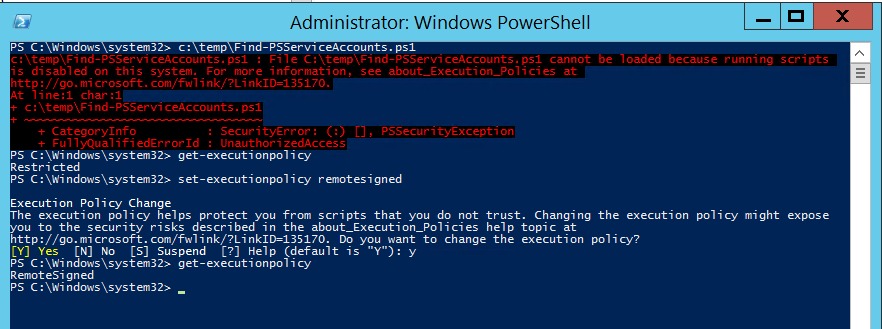
Anyway, for what it's worth the only reference to that command online is from Apple discussion boards or third party sites. There's no documentation from Apple themselves. For PowerShell, Microsoft has this type of policy well-documented:
> Most of my time on it these days is supporting others
In general, I actually disagree with even this sentiment, that macOS is worse because it is harder to help others fix certain kinds of problems.
The problem with supporting people on "easier to modify" operating systems is that it creates tech debt. Modify some system files? On the next OS upgrade, they might get overwritten, or, worse, it might cause bugs. Teach a tech beginner that they can google and download an app that solves their problems? The next they they decide to try this on their own, they might unintentionally download a virus, and the OS won't give them a bunch of warnings when they open it.
A system with a loose security policy make it easier for things to work for now, but a tighter security policy makes it potentially easier for the help you provide to cause less pain down the line, even if it means jumping through more hoops right now.
When you help people resolve issues in other operating systems, consider the fact that they might run into just as much hassle, except that it is not visible to you because occurs months or years down the line. (Those issues are potentially more costly, since you might not be free to help at that time.)
No opinion about which system is easier to support in practice with all of this considered, I just wanted to point this out on principle.


Yeah, such a power user that you can't use any one of the easy, documented ways to deal with that? You're not exactly helping your case here.
>Put it behind some shell command or something... but have it easily documented and marketed towards people like me.
Man page for spctl is all there. Or how about quarantine? That's just controlled by an extended attribute (com.apple.quarantine) and you can remove it (interactively or via script including recursively down a directory tree) with xattr. Want to totally disable SIP too? That's also documented and there, boot to recovery, pull up the terminal and With SIP off you can also then modify what it applies to in a more fine grained way if you want.Yeah, Apple has put up more guardrails in macOS. But contrary to your assertion, enhanced security is plenty useful for "power users" too. Being a power user doesn't mean that it's nice to have some bad software clobber your install or a zero-day nail you. Some of the new security features could definitely be made much more easily useful for power users sure, up to and including having a GUI on them. It'd be nice if Apple had functionality to easily have your own root signing setup alongside theirs, so that we could take advantage of all the signing mojo as well. And it's reasonable long term to be concerned about a day when Macs also have hardware trust chains and what happens then.
But for the time being macOS remains 100% modifiable for an actual genuine power user. The new stuff can be turned off, and more easily arguably then back when you needed to recompile your own kernel to mess with kern.securelevel and the like. Somehow someone in the company continues to open source a certain amount of macOS same as the old days, see https://opensource.apple.com/.