Some people are saying that they don't feel the need for > 1 Gbps in a home network.
As a counter-point, I'm regularly limited by 1 Gbps PHY limits. During the 2 years of the pandemic I've been working from home with gigabit Internet. Why gigabit? Because that's the "speed limit" of the Ethernet PHY in the fibre broadband box, and also my laptop's ethernet port.
My laptop can write to disk at multiple GB per second, or tens of gigabits.
I transfer large volumes of data to and from a "jump box" in Azure that can easily do 20 Gbps out to the Internet.
I regularly update multiple Docker images from scratch that are gigabytes in size, each. I then upload similarly large Docker images back to Azure.
Even when physically present at work, I'll regularly pull down 50-200 GB to my laptop for some reason or another. One time I replicated an entire System Center Configuration Manager deployment (packages and all!) to Hyper-V on my laptop because the NVMe drive let me develop build task sequences 20x faster than some crappy "enterprise" VM on mechanical drives.
I have colleagues that regularly do big-data or ML queries on their mobile workstations, sometimes reading in a decent chunk of a terabyte from a petabyte sized data set.
All of these are still limited by Ethernet PHY bandwidths.
Note that servers are 100 Gbps as standard now, and 200 Gbps is around the corner.
The new Azure v5 servers all have 100 Gbps NICs, for example.
A lot of that sounds pretty incredibly wasteful and I don’t think it should be something to strive for more of.
Docker images are layered for a reason. If you’re having to download multi gigabyte docker layers multiple times, something has gone very wrong.
Azure charges (like the other major cloud providers) by egress data. I feel bad for whoever is paying the bill for 20gbps going out.
In general, people in ML shouldn’t be pulling raw data in the hundreds of gigs down to mobile workstations. That’s a security and scaling disaster.
Trying not to be too much of a curmudgeon here, but this is the problem with 1 gbps connections. They are so good they prevent you from doing the right architecture until it’s far too late.
A good remote work setup should leave all of the heavy lifting close to the source and anything that does need to be downloaded should be incremental/shallow copies. You should be able to work from a stable coffee shop WiFi connection.
"You should be able to work from a stable coffee shop WiFi connection."
I think there are different philosophies, just like 'no comments allowed in code', this is a matter of judgement.
I saw 5 different corporations setup centralised workflow, and usually you end up with a massive cloud bill, incorrectly configured admin rights, under-resourced VDI, and a ticketing system that takes a week to resolve the smallest issue.
If we assume for the moment that data in question is not highly sensitive (for example public satellite imagery), there is nothing wrong with getting every dev a beefy workstation with 50 TB of storage and a 20-core CPU, and it's often even cheaper.
Then again, if it is public (or not-sensitive) data, why make it part of your infra?
If you are working with ML and have public datasets, just use the original source. Make a public mirror if you want to collaborate. Make it accessible via BitTorrent. You can bet that the amount of savings you will get from AWS will be enough to give each dev a NAS with a few tens of TB, which then they can even then use to host/mirror the public data by themselves.
My specific example was a private data set hosted on-premises (satellite imagery).
The analysts were pulling down a ~0.1% sample to develop the ML algorithms locally, and then deploying the final thing in the cloud to run through the whole petabyte.
Local development has its advantages, such as high flexibility and very fast cycle times. It's fantastically expensive to outperform a modern PCI 4.0 NVMe drive in the cloud. Locally it's a $200 part.
> If you’re having to download multi gigabyte docker layers multiple times, something has gone very wrong
When I worked at Vercel during the days we supported Docker hosting (back when it was still ZEIT), we saw that even among many tenants on the same machine, the "layers" thing wasn't really that beneficial - we still had to fetch a ton of stuff over and over again.
So this is great in theory, but it doesn't really pan out in practice.
I always thought it was a little strange given that layers are easily CDN-cacheable indefinitely. That said I'm sure they're using something like a CDN but even the cheapest bandwidth gets expensive at level of scale.
> Docker images are layered for a reason. If you’re having to download multi gigabyte docker layers multiple times, something has gone very wrong.
Well the images need to be in some order, and if you are fine tuning the very initial parts of the image, this can happen.
But it seems a better transfer algorithm could be used for those individual layers. It rather seems like if they don't match, everything's transferred, while there could be a lot better options as well. If we consider that they are structured like file systems then it opens even more options.
---
So I took a peek on my local Docker installation. It seems the layer files on the drive are gzipped json.
That's right, .json.gz, _that includes the files BASE64-encoded_.
Yes, I believe there is room for improvement, if this is also the format they are transferred in.
I wasn't really consider space overhead, which as you notice is small, the encoding just something I noticed. Just json+bloatified binary+compression seemed the epitome of solving problems with a hammer when you know the hammer really well.
But as commented to me, that was incorrect, the payload in the files I saw was actually binary-encoded metadata. The actual archives are stored only in extracted form in the client and .tar.gz in the registry. Not that putting binary metadata in JSON is really optimal to me either, but maybe there are terrific reasons for doing it. Just check /var/lib/docker/image/overlay2/layerdb/sha256/*/tar-split.json.tar.gz; the fragments seem to be straight from tar, so maybe tar is used to interpret them?
Certainly .tar.gz files are not the most optimal for the purpose of incremental updates either. It's difficult to say how much a more sophisticated transfer protocol/storage format would benefit registry servers, though some clients could benefit a lot from it.
If a space-efficient merkle-tree-hashed archive-format suitable for efficient incremental updates doesn't exist, then someone should make one ;-).
You are correct; I too hastily took the "payload" in the tar-split.json.gz to be the binary itself, but it's something else.
Nevertheles, an archive format other than .tar.gz could be transferred more efficiently given a previous version of the same image. Or, even .tar.gz could be transferred more efficiently if both ends extract the file first, and if there is a need to preseve sha256, then that needs a bit more work.
As a counterpoint: I had 10G networking and went back to 1G last time I reorganized. Haven’t really missed the 10G for now.
I ditched the 10G because the 10G switch was hot and noisy and had a fan, whereas my 1G equipment was silent and low power. This could be overcome by putting the switch in another room, obviously, but I haven’t missed it enough to go through the trouble yet.
> During the 2 years of the pandemic I've been working from home with gigabit Internet.
Doesn’t this make every other point in your post moot? I’m similarly limited by Gigabit internet, so the only time I benefit from 10G is transfers to/from my local NAS. I realized that I almost never lose time sitting and waiting for NAS transfers to finish, so even that was only a rare benefit.
If I was buying new equipment and building out something new, I’d pick 2.5G right now. It’s significantly faster than 1G but doesn’t come with the heat and noise that a lot (though not all) of 10G switches come with.
I’m sure I’ll go back to 10G some day, but without >1G internet and no local transfer use case, I found the extra hassle of the equipment (laptop adapters, expensive/hot/noisy switches) wasn’t really worth it for me yet.
All of my 10g equipment is silent or near silent. Most recent purchase is the TP-Link TL-SX105. Take another look the next time you redo your home network. At least consider multi-gigabit.
This is exactly where I ended up recently. I went from noisy and power hungry Cisco/Juniper 10G switches to a silent Ubiquiti GigE switch with PoE and haven’t been happier.
10G was cool but I can’t recall a single instance where I really wish I had it back.
> 10G was cool but I can’t recall a single instance where I really wish I had it back.
Same. It only really made a small difference to my most transfer-heavy workflows. Even a fast NAS is still slow relative to local storage (it’s not just about sequential transfer speeds).
I’m sure I’d feel differently if I was doing something like video editing where I had to move large files back and forth frequently and wait for them to be ready.
If your provider offers 10 Gbit/s, you only need to change the fiber optics modules at either end of the connection. The same lines can be used, no need to run anything extra.
I don’t see a use case for 10gb Ethernet in your home network in your post, unless I’m missing something? It sounds like your ISP is limited to 1gbps and all your use cases seem to be bottlenecked by it.
Do you have home servers you forgot to mention that you’re uploading docker images to, and those could benefit from 10gb Ethernet?
(For me, I use gigabit Ethernet everywhere at home but sometimes need to transfer large disk images from my desktop to my laptop, and using a thunderbolt cable as a network cable helps here, I can get closer to 2 gigabits of transfer speed before disk writes seem to be the bottleneck.)
More devices used at once? If I am downloading 1 Gb/s from the internet, and meanwhile one of my housemates want to look at a movie from our NAS, the other one wants to backup 100 GB of photos to the same NAS - then 1 Gb/s home network is not enough.
Your 1G switch should be able to do 1g from your computer to your internet router and 1G from your roomate to the NAS and whatever from your NAS to the guy watching movies. Even cheap gigabit switches can process (large packets) at line rate on all the ports. If your NAS is also your internet router, maybe you can't make it work with a 1G switch, unless it can do link aggregation.
I'm not arguing against faster networks, but scenarios like "one fast download makes video streams buffer" can be solved by using better routing algorithms (CAKE for example) instead of making the pipe so wide that it'll never be close to full. One of these is a configuration flag that you can flip today and costs nothing, the other means upgrading infrastructure.
I am confused, as the link appears to say the opposite.
> Conclusion:
>The majority of 4K movies (75%) I tested have bitrates over 100 Mbps and many seconds where bitrates spiked over 100 Mbps. Some have 100s of seconds where bitrate spikes over 100 Mbps, and will most certainly cause problems if played with bandwidths less than 100 Mbps on devices that don't buffer well such as the LG TV or Roku TV. To make sure you get the best experience without any buffering or transcoding on such devices, you need to make sure you have a bandwidth that exceeds at least 150 Mbps to play most 4K movies properly. Ideally, it should be higher than 200 Mbps.
The highest average bandwidth shown was 73 mbps. You probably need 150mbps to comfortably play 1 4k move, but once you are looking at the effect 4k movies have on higher bandwidths, average bandwidth becomes more relevant. You could pretty easily stream 10 4k movies over a 1gbps channel since the odds that all of them will be over 100mbps at the same time is low (and even if it happens briefly, it will be handled by buffering).
> certainly cause problems if played with bandwidths less than 100 Mbps on devices that don't buffer well such as the LG TV or Roku TV
"If" is doing some heavy lifting there.
The linked post shows that the average bitrate of every sampled 4k movie was less than 75 Mbps. The author even bolded "on devices that don't buffer well such as the LG TV or Roku TV"
I have Jellyfin setup and there are times when 3ppl would watch something. My entire collection is the highest quality I can find on the net so normally a movie would be around 80-100GB.
Plus I have a service which downloads stuff for the archive team so that’s always doing some network traffic.
There is also a CI gitlab worker and that is also always doing some build with docker images from scratch.
I just wish more than 1Gbps was something that was offered and I can upgrade but so far I’m limited by my ISP with no way to upgrade. Inside my network I have 10Gbps and I have never hit that limit. It was expensive and I needed it for a now deprecated servicing.
Doesn't matter when the entire network bandwidth is taken by my 1 Gb/s download and/or the photo backup. Everything on top of that needs too much bandwidth then.
1 Gb/s network is probably enough for most people, I agree. But I certainly think there are many use cases for faster networks, especially in digital-heavy households.
I have a Linux NAS with 6 7200RPM HDDs in a raidz2 ZFS pool, and the local fs read speed on large files is 7 times faster than GbE, about ~930 MB/s. So while this wouldn't saturate a 10GbE link, it would still be greatly beneficial to multiply the network read speed by 7-fold by upgrading from GbE to 10GbE.
With dd. And normally when I do this I drop the caches with "echo 3 > /proc/sys/vm/drop_caches" but this doesn't work with ZFSOnLinux as it has a separate ARC cache that doesn't get cleared by that command (and I don't believe it's possible to clear it, other than by exporting and reimporting the zpool.)
So I read a 10GB chunk of a file that I know is not cached:
  $ dd if=/some/large/file of=/dev/null bs=1M count=10240
  10240+0 records in
  10240+0 records out
  10737418240 bytes (11 GB, 10 GiB) copied, 11.3378 s, 947 MB/s
The 947 MB/s figure printed by dd matches the speed reported by a "zpool iostat tank 1" running during the benchmarking, which confirms I'm not reading from the cache. When I repeat the same command, dd completes almost immediately reporting a speed of about 6-8 GB/s on my machine, while the zpool iostat command shows zero read bandwidth.
It's a ZFS-based NAS with an SSD cache. Right now it's only 1x SATA3 SSD which means it will top at 500MB/s (so slightly less than a half of 10GbE) and I am planning to add one more which will make it almost saturate a 10GbE link.
Additionally yep, I plan to have one NVMe dataset sometime this year.
And even further, I plan to add a few enterprise HDDs in stripe and mirror. If you have 8 (with capacity of 4 for full mirroring) and each is at 260MB/s then et voila, you get 10GbE again.
Those same people should also know that spinning rust can go very fast as well... My 8 and 12 drive spinning rust pools can read at 500MB/sec easily and get close to GB/sec.
But the 10Gbit network is there for the flash pool.
Yeah, but... The noise! I just can't handle spinning rust anymore for this alone even if the $/GB ratio is still so much better.
Consumer SATA SSDs are plentiful enough that I'm just going all in on flash when I revamp my server and do an 8 drive (+1 hotswap) RAID10 build or whatever. I don't need +60TB or anything and 8-9 drives is about the limit you can find on high end consumer mobos I think...
Put 8 high-quality HDDs in a stripe & mirror config. Thus you can read from 4 simultaneously. They each top at 260MB/s. That amounts to little over 1GB/s -- which is 10GbE.
For a moment I thought about setting up 10GbE at home, but then I realized there is no point yet because my external connection to internet is limited to 1 gigabit.
The only use internally would be central storage server. But all the new NVMe SSD's are faster than 10 gigs, so my internal network would be the bottleneck.
The next logical step would be upgrading to 100 gig network, but that is too expensive right now. I should buy more fast NVMe storage for that money.
If I could get 10 gigabit connection to internet, it would probably make more sense, but I don't see it coming that soon. And I'm paying 15€ for 1 gigabit right now, I would not be willing to pay much more for 10 gigabit connection.
On top of that, my Zabbix monitoring data shows that I rarely saturate the 1 gigabit connection to internet. Most of the time I don't need more than 10 megabits.
Oh, and I would never actually use the copper cables with RJ45 for anything above 1 gigabit. Those ethernet cards heat up a lot, use too much energy. This would be a bad investment. Get a proper patch or optical cables and use SFP+ instead.
I’ve never had this as a problem, and I use 50-100ft of Cat5e + 10GBaseT SFP+’s… it’s well within the thermal limits of the SFP, which probably uses 2-5W.
I'm surprised you're able to get anything reasonable for 10G over any modest length of cat5e, i made a few attempts at doing it for fun when i was upgrading some of my stuff and could only get anything to work with cat6 at a minimum for more than a few meters.
What I found was that the bottleneck was often my home firewall. Plenty of bandwidth inside, plenty to the cable modem…but using a Cisco or Palo SOHO firewall of hand capability was more than I wanted to spend…sure I could have set up a VM environment and run a virtual firewall…but I didn’t really want to. I’d done that in the past and talking the wife through a safe VM environment cycle when away from home and something went wrong was…harder than telling her to power cycle a netgear product.
A few months ago, I bought 2 10GbE NICs off Ebay to connect my main desktop and basement server directly. Since then, I've never seen a transfer between them that was slower than 120 MB/s, usually about 160-200 MB/s. (no RAID or NVMe to NVMe transfers)
Some advice: make sure you know the form factor of your NICs. I accidentally bought FlexibleLOM cards. They look suspiciously like PCIe x8, but won't quite fit. FlexibleLOM to PCIe x8 adapters are cheap though.
How do you regularly pull 50-200 GB? This sounds like terrible practices or implementation at work.
I've never seen docker images of that size that can't be shrunk with multistage, or docker shrink. I can see how someone could get to that size with just baking in all their models to the image itself but yuck.
windows docker images are incredibly bloated. I don't think I've seen one that size, but the base image for a windows container is like 17GB by itself, if I remember correctly. Basically just pulling down an entire Hyper-V image.
they only get larger from there. Largest on my machine right now is showing to take 20GB. Granted there are a lot of shared layers between images, so the amount of space on-disk is much less than 20GB. But if you don't have any of the layers already? You're looking at 20GB easy.
Total size on disk was 8.7GB but we are talking about download here.
I would say you should be moving to .Net 6 it's been several years now that .Net Core has been out so there is no excuse.
None of this is an excuse to get a 10Gbps internet connection to your house. I have a 500Mbps connection and with the corporate firewall my laptop gets 100-200Mbps connection and pulling those containers was like 10 minutes.
> As a counter-point, I'm regularly limited by 1 Gbps PHY limits. During the 2 years of the pandemic I've been working from home with gigabit Internet. Why gigabit? Because that's the "speed limit" of the Ethernet PHY in the fibre broadband box, and also my laptop's ethernet port.
same, I live in a rural village in france where I get 2GB fiber. Yet all my computers aren't able to leverage that.. quite frustrating to see speeds being limited at 110/120 megabytes/s where my drives are easily able to handle gigabytes.
Switches: when I last looked, there were cheap mikrotik switches and tp-link, if you want to buy new. Otherwise search on eBay/craigslist/etc.
Network cards: intel, mellanox, solarflare. Intel has a lot of drivers for all OSes, mellanox is most stable electrically (you can provide it with separate power, no need for fancy adapters, just plug any 12v in), solarflare is cheapest on ebay if you buy 2-3-generations old cards. Actually, any 10G network card will do, just check if they have drivers for your OS.
Thunderbolt: there are ready-made eGPU cases, they are costly but easier to handle. If you want to be cheap: wait for sale of any thunderbolt3-to-nvme adapter. PCBs for all of them are made by the same factory (you can find it on alibaba/taobao) they differ only by box and branding. Based on intel JHL6340
edit2: just checked eBay, the cheapest solarflare "S7120" (it is SFN7022F actually) is $15 (!) + free shipping, wow. Though you'll need some sfps, they start from $6 (FTLX8571)
Yeah, I had a hell of a time trying to get our internal network to 100Gbps and was told by multiple experts I was being too ambitious. I ended up with 100Gbps between switches and 40Gbps to the servers.
I use a map-maker app for creating game levels, the data is stored on a central server when it's saved.
A 4kx4k map layer section, in RGBA is 64MB. Each layer on the map has multiple types of mask applied (brushed alpha, brushed noise-function,...) so there's another 64MB of XXXX data per layer. A map can have (say) 10 layers on it, so we're up to 1GB, and then there's the data for ephemeral layers ("stamped" images at co-ords and scale, alpha,rotation). The stamps themselves are usually stored in an 8kx8k layer so that's another 256MB
When your 'save' action is 1.5GB of data, a 10Gbe network is much preferred over a 1 Gbe network...
All of this is rendered down for production of course, but during development, each layer is kept separate along with its masks.
8 bits per mask, more than one mask, packed into a 32-bit value.
1st one is typically a brush-in one - basically just Alpha brushed in from various alpha-brushes over the map
2nd can be a noise function, where the 1st alpha mask is multiplied by the second to get a brushed noise, and the noise might be useful for randomly-shaped patches of different-colored grass in a scene
3rd might be a shadow mask, where any objects "stamped" on top apply a default shadow at a given angle, and that default shadow is written into this channel. Then the map-maker can alter those if (for example) a shadow hits a wall.
Then there's the shader mask - so you can select a given shader for a given area of the map. These'll all be batched up later, but if you want flowing water, brush in where you want the water shader to be applied. Same for smoke, lava, etc. etc.
I went to 10GB ethernet (and 2GBps Fiber to the home) and I couldn't go back. It is amazing. I did have to upgrade the NAS to be able to handle consistent >1GB streams in and out though.
> Azure that can easily do 20 Gbps out to the Internet
I have tested Azure and AWS speed out to the internet and they too won't get 20/100 Gbps. That high bandwidth is for connecting instances within the AZ. Once any of the traffic has to go over the internet it's much lower.
> I'll regularly pull down 50-200 GB to my laptop for some reason or another
This is a serious failure in your workflow. You should be looking at reducing that size considerable in terms of a docker image.
It depends on context, but we solved this at work with virtual desktops through VPN. The heavy lifting is done on-site, the users have a thin client that barely exceeds one Mbps.
Yes, virtual desktops suck in several aspects, but we couldn't expect everyone to have gigabit Internet at home.
I've been ranting about this for a while tbh. Network interfaces used to be one of the fastest interfaces on a computer. Now they're one of if not the slowest save for USB2 or bluetooth.
1GbE networking is one of the slowest interfaces on modern computers.
- The slowest USB3 spec is 5Gbps. USB3 is a mess, but you can easily far exceed 1Gbps with the absolute worst of it.
- The current fastest USB spec is USB4, and is at least 20Gbps, and sometimes 40Gbps
- Thunderbolt/Lightning both push 10's of gigabits depending on spec
- 802.11ac ("Wifi 5"/"Wave 2") is capable of Gigabit speed, and 802.11ax ("Wifi 6") easily exceeds 1Gbps
- Even Cellular connections can exceed 1Gbps these days with 5G, though admittedly realistically you're looking at 100Mbs-1000Mbps
- Individual SAS/SATA SSD's often push 3Gbps, and SATA itself supports up to 6Gbps, with SAS up to 12Gbps.
- PCIe NVMe in it's slowest spec (Gen3 at 2 lanes) is still 16Gbps, most typically running at up to 32Gbps at Gen3 x4
- PCIe5 consumer devices have launched (Gen5x4 lane NVMe is 128Gbps)
- PCIe6 is around the corner for enterprise
To add insult to injury, in the consumer space they're trying to tout 2.5GbE as some sort of premium new NIC, despite it replacing 10GbE in the premium NIC space from several years ago (eg Asus X99-E-10G-WS). It's maddening. 10Gbase-T, 10Gbe, and Cat6a has been around for well over a decade (to say nothing of SFP+ 10G). Granted they're starting to reposition 2.5GbE as the new 1GbE, which is far more sensible, but still positions your NIC as one of your slowest interfaces
1GbE is the limiting factor to speeds these days, with internal storage/devices and nearly all alternative interfaces vastly outspeeding 1GbE. Even cheap external SATA SSD's and a common usb3 cable can greatly exceed your 1GbE network speed. If you have multiple devices, and want to transfer data between them, a network cable is supposed to be the superior choice. Not Wifi, Not USB, but a network cable over the local network. But it's actually much faster to plug a drive into one device with USB, transfer the data, unplug, plug into the other device, transfer again, than to use a standard 1GbE network interface. Shameful. Just because your WAN interface is likely 1Gbps or less doesn't mean there isn't a use at the prosumer level for >1Gbps network connections for use at the LAN level.
Ethernet is by far the longest connection out of all of those, supporting up to 100 meters for 10G over copper and over 300 meters for fiber [1] which is pretty impressive. No other commodity interface comes close to that kind of range at that speed.
Wifi 6 officially has a real world limit of 700mbps [2] and drops to half that if you're more than a few feet from the router. Passive USB 3 and thunderbolt cables have a max length of 2 meters [3]. The rest of the interfaces you've listed like PCIe all operate on the scale of inches and plug straight into the motherboard.
Plus it really isn't very expensive to upgrade to 10G given the use case is pretty niche for home use. You can get a budget SFP+ Switch and 2 NICs for ~$300.
Yes. The connectors have different lengths, as some are internal and some are external interfaces, both of which are part of the chain in transferring data from storage device in one host to a storage device in another host. The point was to illustrate the bottleneck among all of the possible pieces in that chain, standard 1GbE ethernet is lagging behind. That's why I specifically referenced NVMe and 2/4Lane implementations when talking PCIe. In this context, run length is entirely irrelevant. It's more relevant to point out that you can network Ethernet connections, meanwhile USB, thunderbolt and Wifi are primarily client <> host connections.
> You can get a budget SFP+ Switch and 2 NICs for ~$300.
Yes, this is part of the problem. In 2016's we started to see mainstream adoption of 10G, which hopefully would lead to the more availabile, more affordable, consumer friendly ease of use twisted pair Cat6a and RJ45 10Gbase-T Switches. Instead, Enterprise had already largely moved on from 10G (largely supporting it as a legacy connector via SFP28 being backwards compatible with SFP+) and Mainstream/Prosumer manufacturers instead decided to regress from the 10Gbase-T deployments to 2.5GbE.
As a result we're not seeing a lot of development in the 10G space, and in many ways a regression towards 2.5GbE. Sure, if you don't mind the noise and know your way around a cli, there are plenty of surplus enterprise switches on the cheap. And I don't mind Optics/DACs. I run 10G at home (cat6a, Intel X550's, Arista 7050T-64, which used to be a few hundred bucks) and 25G/100G in the lab (CX4 LX's/CX6 VPIs connected to an Arista 7260CX-64). But it is unfamiliar to most consumers. Not a huge hurdle, but a strange ask considering 10Gbase-T with familiar twisted pair and rj45 aint new by any means. Mikrotik and UBQT both have some options in the space, but the cost of these newer switches certainly doesn't fall in the $300 budget, unless you only need like 2-4 10G ports on the switch and are fine with SFP+. And yes, >4PHY 10G SFP+ and/or 10Gbase-t switches exist, but you're not getting them and NICs w/ DACs (or especially fiber if you need a longer run akin to a standard Cat5 deployment) inside your $300 budget, and there's very few on the market that'll fit in your budget even if you stretch it to $500.
TL;DR: Yes, 10G is technically available, but it's a strangely esoteric niche that exists after the mainstream decided to regress from 10GbE towards 2.5GbE.
I have had a lot of trouble with the Marvell AQtion controllers under Linux. They are supposed to work and are plug and play on modern kernels, but I was never able to resolve a bug where the controller stopped working after a few hours. The only resolution I found was rebooting, which made the controller not very useful.
The Intel 10GbE controllers are more expensive, but much better in my experience.
If someone wants to buy additional 10G card, and has ~300 USD to spare I suggest Intel E810 series. The cheapest E810 version is, I believe, E810-XXVDA2 which has 2x28Gb SFP ports (so good for the future), and uses PCIE4, which makes it work with 10Gbps bandwidths even in x1 ports (though the card is physically x8 in size, so you need an open x1 port), and sometimes you have just a lonely x1 on your MB if you use the rest for 3 gfx cards for god-knows-what purpose :)
Same experience with a bunch of Aquantia AQC-107 (ASUS XG-C100C). Had to remove them from a Linux server, it just won't work and botch IPv6 traffic (especially routing advertisement notices ?!). Got Intel x550t2 and all the issues miraculously disappeared.
I have this controller, and I was able to mostly workaround the dying issue by having a cron script ping a network device every minute, and when that fails it restarts the link - `ip l set enp70s0 down; sleep 6; ip l set enp70s0 up`.
But that's acceptable only because that machine has a workload which can tolerate not having network access for a few minutes per day or so.
ADT-Link[0] makes a lot of them, with the cable coming out left, right or "front" of the M.2 card, and with the PCIe slots in all kinds of orientations.
↑ this one does support gen3. Anyhow, with 4x@gen2 you’ll be fine at 10G speeds (I checked). Gen3 is strictly needed only if you want 2 (or 4) ports, or 25G...
It's interesting to see just how slow faster ethernet standards have been. Feels like I've had gigabit ethernet at a pretty low cost for nearly 20 years now, but faster than that has been pretty esoteric outside of the datacentre.
I guess there really isn't much demand for faster than gigabit speeds even now (outside of servers?)
2. 1Gbps Local network transfers are seldom slowed by the network (as large file work typically involves HDD still)
3. Where local network transfers are impeded by the network speed the transferring itself isn't a frequent enough and blocking thing that people feel they need to fix it... they just go make a cup of tea once or twice a day
4. There are a lot of old network devices and cables out there, some built into the fabric of buildings (wall network sockets and cable runs)
5. WiFi is very very convenient, so much so that 250Mbps is good enough for almost anything and most people would rather be wireless at that speed than wired at a much higher speed (gamers and video professionals being an exception)
And ultimately, the cost and effort of investing in it doesn't produce an overwhelming benefit to people.
Even in quite large offices, it's hard to argue that this is worth it when the vast majority of people are just using web applications and very lossy audio and video meetings across the internet.
Another factor: data centres moved to fiber. And fiber is less physically robust and not great for desktop connections or plugging in to a laptop.
10GBASE-T exists, but it turns out pushing 10gbit/s over 100m of twisted pair requires chips that are hot and power hungry. Again, not great for desktops or laptops. And because it’s not used in data centres, there are no economies of scale or trickle down effects.
Gigabit Ethernet and wifi being “good enough” combined with 10gig over twisted pair being expensive and power hungry means that the consumer space has been stuck for a long time.
2.5Gb ethernet seems to be starting to trickle out at least. It's becoming a more common thing on desktop motherboards. Doesn't seem like there is a lot of 2.5Gb routers yet though.
Thank Intel for single-handedly changing the 2.5Gbps landscape by integrating 2.5Gb Ethernet on their chipsets, allowing no-brainer OEM integration. Unfortunately, unless ISP router OEMs (Nokia, Zyxel, Huawei et al.) do their part (the reason being that very few people actually bothers to buy a separate router), we will not see the economies of scale necessary to fully finish 2.5Gb Ethernet.
Maybe this used to be the case long ago, but I don’t think it’s true today. Personally I’m pretty rough with fiber (having slammed cabinet doors on fiber, looped fiber around posts with a low bend radius, left the ends exposed to dust, etc) and had no issues within a data center. Can’t say the same for copper. Even the cheapest 10km optics have more margin when your link is only 50m.
Oh and bend insensitive fiber is dirt cheap and works just fine when it’s tied into knots.
Yes, even in my days with FDDI (pre-2000) you could wrap them around your finger, no matter if multi- or single mode. At least for 'demo'-purposes, to stop the hyperventilation of some people. Nonetheless I've seen horrible installations, where I've straightened out the gordic knots when I've seen them, just to be sure ;-)
The robustness gap has narrowed (not just with better fiber; some cat-6 STP is surprisingly fragile compared to old cat 5), but I think copper is still more robust for short runs where there will be many insertions and removals.
> And fiber is less physically robust and not great for desktop connections
i buy armored multimode patch cables for, i dunno, 10 or 20% more per unit length, and they seem indestructible in my residential short-distance use cases.
> Gigabit Ethernet and wifi being “good enough”
i think this explains it all. when the average user prefers wireless to wired gigabit, we know how much bandwidth they actually need, and it isn't >=gigabit.
It takes special connectors to survive being disconnected and reconnected daily and cables left disconnected with out the risk of an accidental laser eye surgery
> It takes special connectors to survive being disconnected and reconnected daily
i don't know what you're using, but the LC/LC connectors i use seem pretty durable, and the springy bit that wears out can be replaced. the SFP+ modules are all metal; i am unwilling to believe they can wear out.
> and cables left disconnected with out the risk of an accidental laser eye surgery
single mode, which isn't human-visible, is of concern but the multimode (which i mentioned using) isn't any worse than a cheap laser pointer. it isn't strong, and you can see it.
I mostly deal with single mode and in industrial environments, on top of the safety hazard fibers left dangling tend not to work when plugged back in due to dust. There are special connectors for applications such as ship to shore that address these issues.
Maybe a laser in your eye is an acceptable risk in your home but I doubt it is an acceptable hazard in a work place.
All excellent points but I'd remove gamers from there:
> (gamers and video professionals being an exception)
I play Stadia, 4K HDR 60FPS, just fine on a gigabit ethernet connection and 150MBit internet connection. Any games not streaming the entire video are fine with just kilobits/s of data, as long as the latency is good.
Gamers aren't a strong answer :D but they're the audiophiles of home computing hardware and networks and the most likely to overspend in the belief that it's better :D
Hm, that's taking it a bit far given that I've yet to see any gamer who believes that e.g. taping plastic bags with gravel to their network cables [1] will lower their ping times (if it is not for weighing down a cruddy connector which only works when you press the damn thing down, that is). There does not seem to be a gamer-equivalent of $30000 speaker cables [2] (8 ft., add $1500 per additional ft.) or $10.000 power cables [3] either. No, audiophiles still hold the biscuit for being the most easily deluded moneyed demographic out there. If Hans Christian Andersen were alive today he'd write a story about it, "The Emperor's new Speaker Cable" [4] where a little boy is the only one who dares to comment on the piece of rusty barbed wire connecting the speakers to the amplifier.
Show me the diamond-dust cooling paste for $10000 per CPU and you'll be right - for a little while. Soon you'll find that paste in larger $50.000 thimble-sized containers to be rubbed under all equipment "to open up the sound stage". Raving reviews will come in, "as if the composer is standing next to you", "the lows were really clearing up, as if the sun broke through the clouds".
Hm, k. BUT...everything counts in large amounts :)
So we have the very few audiophiles which totally ignore the thin copper layer on cheap PCBs, versus the whole market segment of twitchy gamers going for Bling, Bling, Bling without function on their RAM, coolers, vs. the equivalent stuff installed in laptops and servers which lacks that :-)
Gamers being hard wired has everything to do with consistent latency in twitch style FPS's. That said, consistent latency is pretty beneficial in most PVP games.
Seems like they're saying that gamers would prefer wired to wifi, which I think is reasonable - it's not so much a bandwidth issue as a latency issue - wifi has higher latency, and higher variance than wired ethernet, especially if you get a crappy client joining and filling up the airtime with retry attempts. But maybe that's dominated by ISP variance for most.
You probably even don't need gigabit. A Stadia stream ranges from 10Mbit to 50Mbit depending on the quality settings. Latency and other network users are far more influential on gameplay.
Looks like SteamLink only has a 100mbit/s NIC? People do often vastly overestimate how much bandwidth things need. The latest 4K HDR Blu-rays are easily streamable over 100mbit/s with a big enough buffer. A big buffer is no good for real-time gaming, of course, so they probably cap the peak bitrate to <100mbit/s which would be fine I imagine.
You might be surprised. There are still quite a few 100mbit/s NICs shipped in new things. It would save them a few pennies. Raspberry Pis only got gigabit NICs in 2018 and only usable at gigabit speeds in 2020. Pis are more capable than a lot of smart TVs I've seen.
10GbE and 100GbE on fiber is quite cheap and easy now - but 99% of consumers and people doing ordinary stuff have no capability or interest in doing fiber. You can terminate cat5e or cat6 with $25 in hand tools...
I think what's new is the prevalence now of 2.5 and 5GBaseT ethernet chips that are cheap enough companies are starting to build them into any $125+ ATX motherboard. At short lengths even old crappy cat5e has a good chance of working at 2.5 or 5.0 speeds.
Even 100GbE is hardly seen on company datacenters. Yes, it's cheaper than before, but still more expensive than 10G, and that's extra cost multiplied by all the devices that need to have the improved hardware to take advantage. Plus, most servers won't saturate a 10G link without tweaks on the setup. For 100G it's even worse, I think it will take a long time to see them on datacenters outside of core links or for companies with heavy bandwidth use (storage, video).
I think the common knowledge that most servers can't saturate a 10Gb Ethernet link is no longer true. In my experience even saturating 25Gb links is rather easy to do when using 9000 byte MTU on mid-tier server hardware.
100Gb links do take some thought and work to saturate, but that's improving at a good rate lately so I expect it'll become more common rather soon.
The main downside to 25Gb and 100Gb links still seems to be hardware pricing. At these speeds, PCIe network adapters and switches get rather expensive rather quick and will make you really evaluate if your situation really demands those speeds. 10Gb SFP+ and copper network adapters and switches are quite inexpensive now in 2022.
> In my experience even saturating 25Gb links is rather easy to do when using 9000 byte MTU on mid-tier server hardware.
But that's tweaking the setup already, it requires changes, testing and verification, and can cause problems in downstream equipment. And for a lot of applications, a 9K MTU will not be enough to saturate the link because they'll need NUMA awareness, or the NIC queues will need tweaking to avoid imbalances, or the application is not ready to send at that speed...
I'm not saying it can't be done, of course it can. But it isn't "plug a bigger card and it'll go faster".
> Plus, most servers won't saturate a 10G link without tweaks on the setup.
That doesn't seem right. When I got my first 10G server, it was running dual Xeon E5-2690 (either v1 or v2), and I don't recall needing to tweak much of anything. That was mostly a single large file downloaded over http, so not super hard to tweak anyway, but server chips are a lot better now than sandy/ivy bridge. It could only get 9gbps out with https, but the 2690v4 could do 2x10G with https because aes acceleration.
> That was mostly a single large file downloaded over http, so not super hard to tweak anyway
Well, my point is that most servers don't just download single large files over HTTP. Even if you only look at storage servers, going into multiple files and connections you can easily find issues and have downgraded performance if you don't prepare the system for the workload.
I'm seeing 2.5 and 5 popping up all over the place. My WiFi App has 2.5 with POE. The aggregate bandwidth of the AP exceeds 1G. Spectrum cable modems have 2.5G ports now and AT&T Fiber is shipping their garbage gateway with a 5G port.
Unfortunately, I'm finding switches with 2.5 to still be overpriced.
As I understand it 2.5 and 5G modes were originally primarily aimed at WiFi APs as real-world capacities started to scale past gigabit speeds but replacing existing wiring for an entire building worth of APs to support 10G or completely redesigning the power infrastructure to support fiber would have been impractical.
Instead we run 10G signaling at half or quarter clock rates and get something that works on the majority of existing wiring.
AFAIK the IEEE was initially resisting supporting this, but enough vendors were just doing it anyways that it was better to standardize.
I wanted to upgrade portions of my home network to multigig because Comcast is giving us 1.4Gbps and I wanted to use it. At least for me, 2.5 switches were way to expensive so I ended up with used Intel 10G cards connected with DACs to a cheap 5 port Mikrotik 10G switch. One 10GBase-T RJ45 SFP+ hooks into the modem.
It's generally around 35-40Mbps upstream and between 600 and 1.2Gbps observed downstream, depending on the time of day.
I would also very much rather have a symmetric connection than what I have now. We are within range of a fiber tap for Comcast's 3Gbps symmetric ftth service but construction costs are too high right now for them to do it. I keep asking every six months regardless. There's no other game in town as far as I can tell.
Comcast Business will run a 100Mbps symmetric fiber for ~$750/mo, maybe that would be a thing to do to get fiber in the door and then switch back to residential after the contract earns out.
... points out that 5GBASE-T needs 200 MHz channel bandwidth which is past what Cat 5e is specified for. So perhaps for runs approaching 100 meters or in noisy environments, Cat 5e won't be reliable for 5GBASE-T after all.
> But I guess most people don't transfer files in their local networks anymore and use their network purely for internet access.
I think this is clearly the case. Most new laptops don't even bother with a wired network port. I've got a new "pro" HP laptop the other day, and it only comes with some cheap Wi-Fi card. And it's not an "entry-level" laptop, and it's thick enough for an RJ-45 plug to physically fit.
I also see more and more desktop motherboards come with integrated Wi-Fi. The desktops at Work (HP) also have had integrated Wi-Fi for a while, and it's not something we look for (they all use wired Ethernet).
Are the ports in pairs at each location? Then it sounds like they did a Very Bad Thing and ran one cable per pair of ports; 100Mbps uses two pairs, so why use two cables when one cable has four pairs, right? :(
I've seen that a lot in much older installations, but I'd expect better from 2015 construction.
I'm busy retrofitting Ethernet in my house by pulling cat6 through the walls and pulling out the old cat3 phone cabling. It's much harder work doing two cables (not least because none of the phone cables were in conduit, so it just starts off harder already) for each pair of ports, but it's very much worth the effort.
there are a variety of ways to screw that up. i've seen a house that has a bunch of cat 5e run, but the installer stapled it down, and most of the cables have a staple through them somewhere along the run, killing a pair or two.
Cat7 is not a recognized standard by TIA/EIA, but there apparently is an ISO standard for it. Also, cat7 doesn't use RJ-45 connectors so it's not backwards compatible with older gear.
Cat6a is probably the sweet spot for home/office/etc structural cabling. It's not much more expensive than Cat6 (or Cat5e in case people are still putting that up), and has more than enough legroom.
Cat Cat6a is a pain to retrofit as it's stiffer and thicker than Cat6 in most cases. It's also more expensive (less so than before, but the delta is still there)
If each run is <55m then Cat6 can still do 10Gbps.
> But I guess most people don't transfer files in their local networks anymore and use their network purely for internet access.
Most people don’t have anywhere in their local network to transfer things to. I still laugh when people see my home server and assume that’s “your work thing”. I do use it for work, but 99.99% of what’s contained in there are family pictures and photos.
People have been using faster ethernet in workstations for a long time, in data intensive jobs. But indeed the commodization has been going much slower than previous gens. My pet theory is that it goes back to the stall in internet connecitivity speeds, which in turn is caused by people jumping en masse to slow and flaky wifi and cellular connectivity. This then causes popular apps to adapt aggressively to low bandwidth and keeps apps requiring high bandwidth out of the mainstream.
It's kind of chicken and egg. It's not worth buying a 10G switch when all or nearly all of your devices are gigabit and it's not worth buying 10G cards for any device when you have a gigabit switch.
What you need for the transition is for premium brands to start pushing 10G ports as a feature, e.g. Apple needs to add it to Macbooks and the Mini and start using it to bludgeon competitors who don't have it. Then once their customers have several 10G devices around, they buy a 10G switch and start demanding that every new device have it. At which point the volume gets high enough for the price to come down.
I've noticed 2.5 becoming a bit more common on enthusiast hardware, so it'll be a while yet before 10G becomes mainstream, but 2.5 and 5 might be the standard for new hardware a decade from now.
10Gbase-T does 55m with Cat6, or the full 100m with Cat6A, both of which are ubiquitous and cheap. It's probably more to do with the expense and power consumption of 10Gbase-T PHY's.
I have a home NAS, but I think I need at least two, maybe three 10G switches in order to get everything hooked up properly. And then I need gear to actually get 10G on my computers. Sounds a bit expensive especially since the NAS is unfortunately limited to 2x1GbE.
Yeah, I’ve been a bit surprised at how few of the home tier NASes can get 10G. A bit of a chicken and egg, I guess.
You don’t need to go fully 10G, though, I mainly prioritized my workstation for example, and if you don’t want to splash out for switches, you can do a direct connection on 10G to a computer that needs it, and use the 1G links to the rest of the LAN.
It's still around 100$ and up (I know you can get it a bit cheaper, but not everyone searches). Gigabit switches, on the other hand, are basically free.
I have gigabit internet (downstream only... hoping for fiber one day for symmetric up/down), and I run wired gigabit ethernet for desktops and fixed devices to free up the wifi. For 99% everyday use it works just fine. Externally I hit 80+ MB/s on internet download (aggregate, very few sites saturate my downstream bandwidth), and internally I hit 90+ MB/s to and from my NAS. The only time I wish it was faster is when transferring really large files to/from the NAS, but only for 10GB+, so the extra cost of either SFP+ or copper 2.5/5/10G upgrade to the network is not really warranted. One day I might install a NVME cache on my NAS and run a straight 10G fiber from my workstation to the NAS, but that's more of a luxury (look I can transfer 10GB file in 10 sec instead of 100 sec!) than need.
I’ve got google fiber 1 gig up and down. It’s plenty fast for external content but internally I’ve been annoyed at the network perf to my NAS so I got a secondary network card just to go from desktop to Nas at 10GbE speeds and it’s been great and it skips the need to overhaul the entire network stack.
It's not abysmal when you consider the standard (signaling, ECC) has to work over 80+km range in some cases. You'd be hard pressed to get a pci link to work over 10M.
That being said, I generally agree that it has been moving too slow in consumer electronics and 2.5G is a pretty long overdue step-up for a moore-adjacent technology. Another factor is the humble reality that infrastructure (physical cables installed in walls) is the (s)lowest common denominator in this advancement.
Maybe once gigabit internet service becomes more widely available, but even for something like a consumer NAS you’re probably bottlenecked by something else no?
My hunch is that for most consumers, there's just no point in getting anything above 1 GbE today, even for their central switch. 1 Gbit/s is more than enough for 5x 4K video streams from their NAS, plus a very fast Internet connection at burst speed. What more do most people need on a regular basis?
Working with files on a network share? Though, I do all my photo editing that way and it feels local over 1gbe. I could see video editing benefiting from it. Pretty niche though.
Spinning HDDs are faster than this as well, 250-300 MB/s sequential read seems common per drive, and in a home setup you might have a couple of those in a RAID-1 giving 500-600 MB/s read BW.
Right, for 2x single stream sequential read throughput + redundancy I guess you need somehing like Linux f2 RAID10 mode. Otherwise reading every other stripe per disk would kill you due to seeks or 50% wasted readahead.
Well, seeing how large SSDs are still very expensive (in my mind it's €100 / TB), my hunch would be that if it makes sense for you to spend that much money on the drives, you probably won't really notice the price of a couple of 10 Gb network cards. They seem quite cheap on eBay if you're OK with used.
The Mikrotiks are pretty reasonably priced (though you need adapters to go to RJ45, and you can only populate every other port due to heat). But you're right, the low end of switches are generally 10-20x more expensive IME.
NAS with HDD and a boat load of RAM can easily saturate 10GbE NIC if you're using it as a media server. Most content on my NAS is cached and rarely touches the disk.
I checked performance on my server locally vs accessing the server as a NAS.
The simple spinning hard-drive was already faster than gigabit ethernet, and the NAS access speed was 90-95% of ethernet. So I am prerty sure that NAS is the bottleneck here. And this is on a WD-red 5400RPM harddrive, nothing special.
I mostly agree, but optical transceivers are still expensive. Been waiting for dirt cheap silicon photonics for a couple of decades now. But it seems they are on track to be a thing, though initially for high-speed networking not home/office type stuff. Maybe one day, sigh.
25Gbps is 39 bucks over MMF, 59 bucks over SMF.
40Gbps is also 39 bucks on MMF (more expensive on SMF)
I don't think any of these are very expensive.
The cards are also ~same price between SFP+ and 10GBaseT from places like startech
(outside of that, the 10gbaset ones are actually often much more expensive)
> Applications that may make use of the module include machine vision in industrial applications, high throughput network data transmission, high-resolution imaging for surveillance, and casino gaming machines.
Does anyone know why is this useful in casino gaming machines?
I was researching about low latency applications and one seems to be webrtc video for casinos where the croupier hands and cards are streaming to the internet for remote players, could be something like that.
Right, I was thinking about that but I would not call it a "casino gaming machine" in this case, more like a casino security system, so I thought it could be something else.
Lots of consumer motherboards don't have a lot of PCIe slots wider than x1 (which is not enough for 10GigE), but they often have multiple NVMe capable M.2 slots, that this card would work with.
In my home server for instance, which is built on a consumer μATX board, the wider PCIe slots are filled with a GPU and HBA, which leaves no way to add 10GigE without spending a lot of money on a new motherboard and CPU - or finding a way to use the M.2 slot.
Port expanders are a thing... Unless you plan to be needing full bandwidth to your GPU at the same time as full network bandwidth, you shouldn't have issues.
I never really understood why motherboards didn't spend a few extra dollars and make all ports 16x ports (switched), so that you can use full CPU bandwidth to any one device and not have to mess with different types of port for different devices.
As others have said, the card also has to be PCIe 4.0. On the used market, I mostly see PCIe 2.0, which means they need quite a lot of lanes.
There's also the fact that people usually use "older" components to build home servers, and if I'm not mistaken, PCIe 4.0 is only supported in fairly recent CPUs, and with not that many lanes; whereas my desktop from circa 2012 comes with something like 40 PCIe 3.0 lanes.
There are a lot of m.2 to full-PCIe adapters on AliExpress. And a lot of cheap 10G cards on eBay.
I’m using 10G in my home LAN already for ~5 years. And just a month ago I contemplated about upgrading my notebooks to 10G.
I ordered a cheap thunderbolt→nvme adapter (for ssds) + m2→pci-e adapter on AliExpress. And they all work like a charm! Total cost was about $55(tb3 adapter)+5(m.2)+25(network card)+$8(SFP+) = 93USD. A lot cheaper than other options like QNAP or Sonnet Solo (which are in $200+ range)
Can someone recommend quality USB(-C) ethernet adapters brand? I'm building an embedded system in a professional context and need to connect some of our own custom in-house built embedded devices (usb-c only, no ethernet) to LAN. Right now, when some device goes offline, I don't know wether it's our product or the cheapish usb-ethernet-adapter which is at fault. Would like to have something 100% reliable.
Have tried both Lenovo and Linksys (USB-A, RTL) - in both cases they would have issues and disappear after hours or days after startup. I can not tell you for certain that it's purely an issue with the USB Ethernet adapters and not something else in the stack (Armbian Bullseye).
Since it's built in-house, why are you relying on retrofitted USB dongles if reliable Ethernet connectivity is important? Unfeasible to make a revision with a port?
Anyway, if I were you I would probably just go ahead and buy one each of the top handful of contenders and try them out myself - they're not expensive and it makes sure that it really works for you, and if not, where the problem lies. If you have the same issue on several adapters with different chipsets, well...
I’d be more concerned with the chip the adapter uses. While I don’t have experience with their USB-C variants I’ve had good experiences otherwise with Axis.
As far as I can tell they seem to be the “go-to” in the USB-Ethernet game and are well supported on Linux and anything else I’ve used them on.
All very well but aren't these devices in most cases the cause of software that is too damned slow? What happens when devs with their 128GB RAM and 64GB graphics cards write things like MS Teams, Slack, Visual Studio, most other IDEs etc.? You get simple apps that take 10 seconds to start up on ordinary desktop machines.
As others have said, there are advantages to pushing people to use normal spec machines to remind them that most of the world don't have 10GbE or even 20Mb broadband but would still like apps to start quickly.
End users don't have to compile the software each time they want to run it. A dedicated performance testing setup with realistic hardware is better than wasting a developer's time waiting for their machine.
They're 50USD or so. The main problem seems to be that they use ~3-4W of power each, and it's more than power budget of a single SFP/+ slot (2W or so), and they become v.hot (~70°C), what can lead to overheating of switches.
Is the power consumption (and heat dissipation) a function of bit rate? E.g. would the same 10GBASE-T transceiver consume less power when running at, say, 2.5Gb/s than at 10Gb/s?
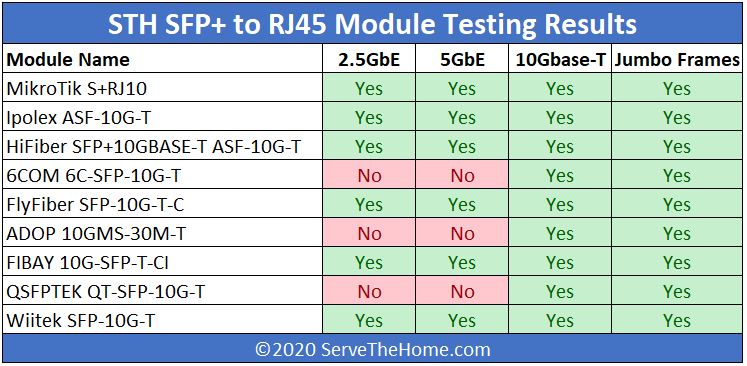
Yes (or at least I've noticed it on mine) but worth noting 99% of 10G RJ45 SFP+ transceivers only support 10G and nothing else. Typically it's only fixed copper interfaces that support negotiating different speeds.
The MikroTik adapters are a bit special in that they are more a 2 port transparent bridge where the inside facing portion of the module always runs at 10g and the outside facing portion auto-negotiates. This allows 10G only switch interfaces to support 10/100/1000/2500/5000/10000 clients. In a MikroTik switch it reports back the negotiated speed and the switch can shape traffic to the appropriate bandwidth instead of letting the adapter do it (which I assume is just policed but could be wrong, never tested). I have a 100G switch which is backwards compatible with 40G and allows breakouts so with a QSA can support SFP+ modules... putting this MikroTik module in I can plug a 10 megabit half duplex device into a 100 gigabit port!
Exactly. If it was SPF+ you could use that. As it is copper only you need to buy a more expensive (and for most uses less good) copper one for whatever you plug it into.
That's really the big reason you don't see more of 10 GbE - over copper it's kind of terrible technology and you should really use fiber. But that's a big jump, so people stay at 1/2.5 GbE.
I thought I'd never needed 10GbE until I tried to copy couple of large VMs from one a server to a new one. Once I upgraded, I realized that my ISP provided bandwidth was actually 1.2 gb/s instead of the 1 gb. Somehow the default 1gbps port was the restricting factor.
A small market that cares about 10G performance but don't have a device with a thunderbolt type-c port which performs much better. I'm sure they'll land eventually though.
The sonnet solo10g works like a charm with osx and linux with just a thunderbolt port, around 9,8Gbps.
Use SFP+ port instead of Ethernet, more options for connection and less power draining.
Been eyeing it for a while now gotta admit. The desktop setup I'm looking at would be pretty expensive with both that and a thunderbolt dock. So annoying I can't get a thunderbolt dock with SFP+ directly instead.
I think a lot are missing that this is extremely low profile and has a separated port in contrast to a more typical PCIe riser adapter and HHHL card. Much more suited for hacking in embedded builds, 1u builds where a gpu already takes the horizontal slot, or even laptops if you're brave enough. I don't think it's meant to replace/compete a standard m.2 to PCIe riser on an HTPC or NAS that most are used to seeing.
Does anyone know if this kind of connector works with a PCIe to M.2 adapter? i.e. I have a PCIe card with an NVMe drive connected, could this be used? My motherboard doesn't have an M.2 slot.
Looks like the compute module 4 has one lane of pci-e 2.0, which gets you to 5gbps (theoretically). So yeah, you'll definitely run out of PCI-e bandwidth.


As a counter-point, I'm regularly limited by 1 Gbps PHY limits. During the 2 years of the pandemic I've been working from home with gigabit Internet. Why gigabit? Because that's the "speed limit" of the Ethernet PHY in the fibre broadband box, and also my laptop's ethernet port.
My laptop can write to disk at multiple GB per second, or tens of gigabits.
I transfer large volumes of data to and from a "jump box" in Azure that can easily do 20 Gbps out to the Internet.
I regularly update multiple Docker images from scratch that are gigabytes in size, each. I then upload similarly large Docker images back to Azure.
Even when physically present at work, I'll regularly pull down 50-200 GB to my laptop for some reason or another. One time I replicated an entire System Center Configuration Manager deployment (packages and all!) to Hyper-V on my laptop because the NVMe drive let me develop build task sequences 20x faster than some crappy "enterprise" VM on mechanical drives.
I have colleagues that regularly do big-data or ML queries on their mobile workstations, sometimes reading in a decent chunk of a terabyte from a petabyte sized data set.
All of these are still limited by Ethernet PHY bandwidths.
Note that servers are 100 Gbps as standard now, and 200 Gbps is around the corner.
The new Azure v5 servers all have 100 Gbps NICs, for example.