> I gave up on the Microsoft authenticator and just switched to manually enter tokens from an TOTP app.
My office considered Microsoft authenticator, but there was push back after looking at their privacy policy and how much access the app wanted on people's personal devices (location, storage, contacts, etc). The nice thing about a little TOTP hardware token is that you avoid the push notification problem and it doesn't collect massive amounts of your data to use against you or sell to 3rd parties.
Even that wants your GPS location (why?), camera (and therefore microphone) access, and storage access. Those kinds of permissions have been 'normalized' sure, but they're also 100% unnecessary considering the job is done just as well (or better as it's without security issues like the one in the article) with a tiny hardware token that requires literally none of those things and couldn't do them if it wanted to.
If you aren't currently handing your location data over to Microsoft 24/7 right now, why should you start?
GPS is for the audit log. I can go into my AAD security center (security.microsoft.com) and view a history of logins in my org that include IP address and approx location.
> GPS is for the audit log. I can go into my AAD security center (security.microsoft.com) and view a history of logins in my org that include IP address and approx location.
You can already get a rough idea of location using just the IP address. Surely enough to know if your user logged in from the same country/state/ISP as usual. Is that really a situation where you need pin point location accuracy? Do you really need to know which room of their house they were in?
Whatever fringe feature is used to justify the access it's not required for authentication and there's nothing to enforce that those are the only situations in which Microsoft will use the access you've given them. Microsoft and Google are in the data collection/ad pushing business and I can't blame folks for wanting to limit the amount of data they leak to those parties.
IP is useless if you are using a VPN a lot of corporate uses of MS will also have a VPN . Many times the vpn won't even exit in the same country so can't use IP.
These kind of logs are typically demanded by customers and customers inturn have either strong compliance requirements (HIPAA FEMA , ITAR etc ) or have suffered breaches and react with collecting a ton of info in a effort to keep it more secure.
That is not say MS is innocent, just that enterprises would demand this anyway.
> Surely enough to know if your user logged in from the same country/state/ISP as usual.
Same ISP, maybe. Every single customer of my ISP shows up (using "IP geolocation") as being in a small office building in a non-descript town. Is that where they are? No, it isn't even where the ISP's main hardware is, that's just an office, the geo-location maps every address assigned to them to their registered place of business, and nothing more.
And to be sure it isn't "required for authentication" and yet, just as with the password rotation nonsense and a dozen other requirements, somewhere there will be a business that is absolutely certain they require this feature, so Microsoft checked the box. That's all Microsoft are interested in, you want to give us $1B but we must check a box? Box checked.
You want Linux support? Box checked. You want package management? Box checked. None of these things are done well but box checking exercises aren't about doing it well they're about checking the box. I assume if you're into actually doing a good job you either soon leave Microsoft or you find some niche team where they'll let you do that in peace.
> That's all Microsoft are interested in, you want to give us $1B but we must check a box? Box checked.
Microsoft is now a company whose purpose is data collection and targeted ad pushing so they've lost any benefit of the doubt. You can be certain that for every scrap of data they're collecting it isn't collected because they are only interested in feature creep/bloat. At this point we have to treat them no differently than Google. We're left assuming that they'll take whatever data they can extract from you so they can use it against you. Their own practices and privacy policies don't offer any reassurances either.
You can already get a rough idea of location using just the IP address.
Being able to correlate the location of the user with the location of the login request is very useful to determine the risk profile of this particular login attempt.
It wants your GPS location for the same reason banks look at your location. Even if they still let an auth request go through, they can alert you through email if a request is approved from an unexpected location. Camera permission is necessary for QR codes so you can setup the authenticator. No idea what the mic permission is about though.
Your IP should provide them (and your bank) enough location info to alert you if your account is accessed from another state/country. QR codes weren't needed to set up the hardware token, so that feels like a feature created to justify the increased access (also phones come with their own camera apps capable of reading a QR code or at the very least photographing one). The mic access is a side effect of android's leaky permission system which hands out the ability to record audio to any app that wants access to your camera.
A lot of times you can deny access to many of those things and the app will still function just fine. Most of the apps on my phone I am not giving half the stuff they ask for.


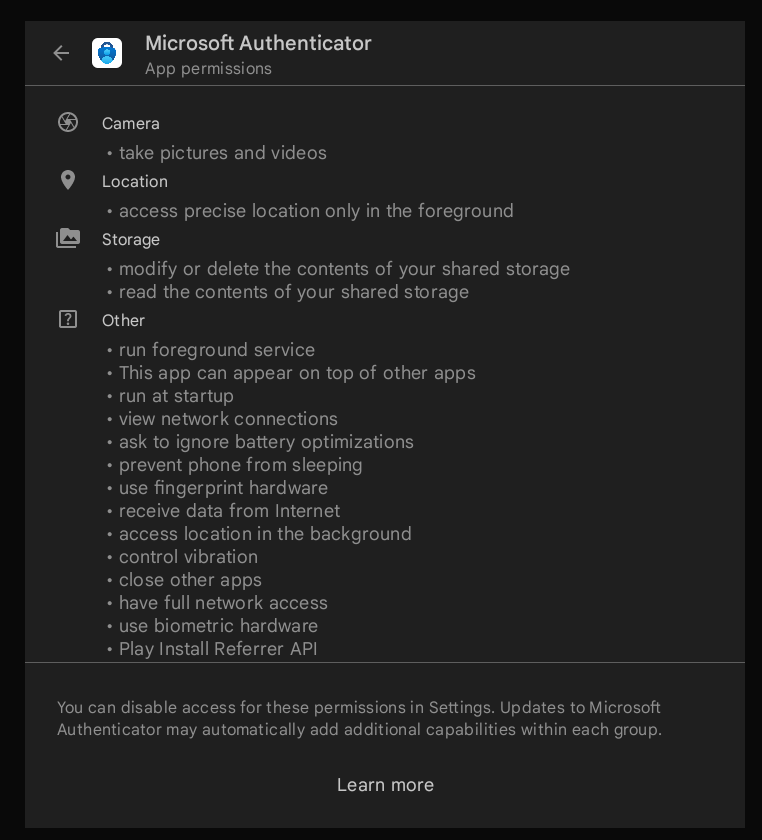
My office considered Microsoft authenticator, but there was push back after looking at their privacy policy and how much access the app wanted on people's personal devices (location, storage, contacts, etc). The nice thing about a little TOTP hardware token is that you avoid the push notification problem and it doesn't collect massive amounts of your data to use against you or sell to 3rd parties.