Hundreds! Doesn't everyone? Most of them are just bash scripts, many of which have now reached a complexity so high that I wish I'd started writing them in a different language but it's too late now. The majority of the rest are Python.
Off the top of my head, the most used ones are:
* A replacement front-end for "tar" and various compressors
* A script to synchronize my music library to a compressed version for playing in my car
* A secure-but-readable password generator
* A system to batch compress folders full of video files. (For ripped blu-ray discs, mostly.)
* A replacement front-end for "ffmpeg", see above
* A "sanity check" program for my internet connection to see if the problem is me, or Comcast
* A front-end for "rm" that shows a progress bar when deleting thousands of files. (Deletes on ZFS are unusually slow.)
> * A replacement front-end for "ffmpeg", see above
I have one of these too... It's kind of frightening how hard ffmpeg is to use without some kind of custom frontend. I have probably dozens of bash/python scripts to invoke ffmpeg for different common tasks.
- One to extract audio
- One to extract all the individual streams from a container
- A couple different transcoding scripts
- One specifically for gifs
- One to crop video
- A few that I can't remember the purpose of... and can't tell from reading the source
You could threaten to kill me and I wouldn't be able to user ffmpeg from memory. I just don't have to use it often enough. So I created a script w/ the settings I usually want to encode certain things that I need to encode semi-often. It definitely doesn't make it easier to remember ffmpeg command line options because I don't have to use them.
kubectl and our home grown command line tools to interact with our build and deployment? I know most of it by heart of course because I use it daily. I really don't like some of the scripts that we have and do it "by hand" instead because I have to use it all often enough that I want to know what is really going on underneath in case things don't go the way they should (and there's always something). I am able to diagnose and fix or work around all these issues with ease because of it, while lots of other people just run the wrapper scripts and if something doesn't work they very often aren't able to even troubleshoot the simplest problems. I'm that guy w/ ffmpeg ;)
I'm pretty sure you meant this in a different way but it reminded me of another thing I see a lot with people.
They have these huge lists (written down in some tool or another) of commands to do specific things and they copy and paste them. It's heart wrenching to see them search for these sometimes (even if they find them) and then they copy and paste them. But they sometimes (many times) don't work or are super simple things. Like the `kubectl get pod` thing I mentioned, they might have that in one of those lists under some heading like "dev environment commands" or somesuch together with 10 or 15 others.
Because they never actually tried to understand the simple logic and meaning behind these command line tools and only ever copy and pasted, they get very easily tripped up by even the simplest things, such as replacing the parts that need to be adjusted for their specific situation, even if clearly marked, such as `kubectl -n <yournamespace> get pod` (or one that comes up even more often in troubleshooting sessions 'The command from the docs does not work and I made sure I copy and paste so I don't mistype it' and if you ask what they did it was `kubectl -n examplenamespace get pod`). Or they might have written down a command from the onboarding docs that combined multiple things into one command line. To fix issues with their environment, they have to basically nuke everything and start from scratch, because only then will their copy and pasted command actually work. They haven't learned to decompose these and use the parts individually or recompose them.
I agree that keeping a cookbook of stuff pasted from the internet without knowing the fundamentals is an anti-pattern.
For me (and probably for GP), my cookbook is stuff that took me more than a few minutes of tinkering or reading manpages to figure out, and it’s stuff that I use maybe once every couple weeks — not often enough to memorize, and annoying if I have to figure it out again.
It’s the ‘wrong’ way to think about it in the sense of subjectivity : powerful in this context means lots of arguments and config settings you have to learn, memorize or look-up.
That means you have to become an expert level user to become fluent (where the user would call it “easy”)
It’s an UX that would exclude entry level computer user (since entry level here means not even knowing where the shell is for ffmpeg) and would perhaps be a barrier intermediate computer users.
ffmpeg arguments generally compose pretty well, although it's powerful enough that (as other comments have mentioned) for special use cases you do often have to look things up.
If you can remember 3 or 4 things you can do most stuff without looking anything up, however:
    -i -> input file
    -vcodec / -acodec -> video and audio codec; "copy" specifies copying the input stream
    -vn / -an / -sn -> disable the video / audio / subtitles in the output file
    -ss / -t -> specify the start time and length of the conversion from the input file
So, just by looking at the above, you can easily see how to extract audio (or any individual stream). For gifs specifically I would recommend using gifski which has much better results anyway. For cropping, I don't find the `-vf crop` syntax too bad.
But when you have differing behaviour based on argument position like putting -ss / -t before the -i or after (fast seek vs accurate seek), it gets confusing pretty fast.
I wrote one of those last week as a sort of poor man’s video editor. Besides aliases for common commands (like extracting a time range without re-encoding), it also takes the tedium out of repeatedly typing file names. Output file names are generated based on the input file name, with a prefix that auto-increments like sql. Input files can be referenced by prefix. It makes a huge difference.
I certainly have. Interestingly, one was the same "sanity check" program for my internet connection, because of the same ISP you mention. Amazing coincidence...I don't think. :-)
I ginned up a "wait for the internet to come back up" script that repeatedly pinged something with one packet, and used the Mac 'open' command to play an mp3 file once the ping succeeded. Unsexy, but when you can't google up a better solution...
I like this idea. Some company that I may or may not work for either does or does not install malware on our computers, extending the boot sequence and something in the network layer that makes it take MINUTES for anything http to be usable, even after the DE is loaded. Would love to add such a script to my login’s boot sequence
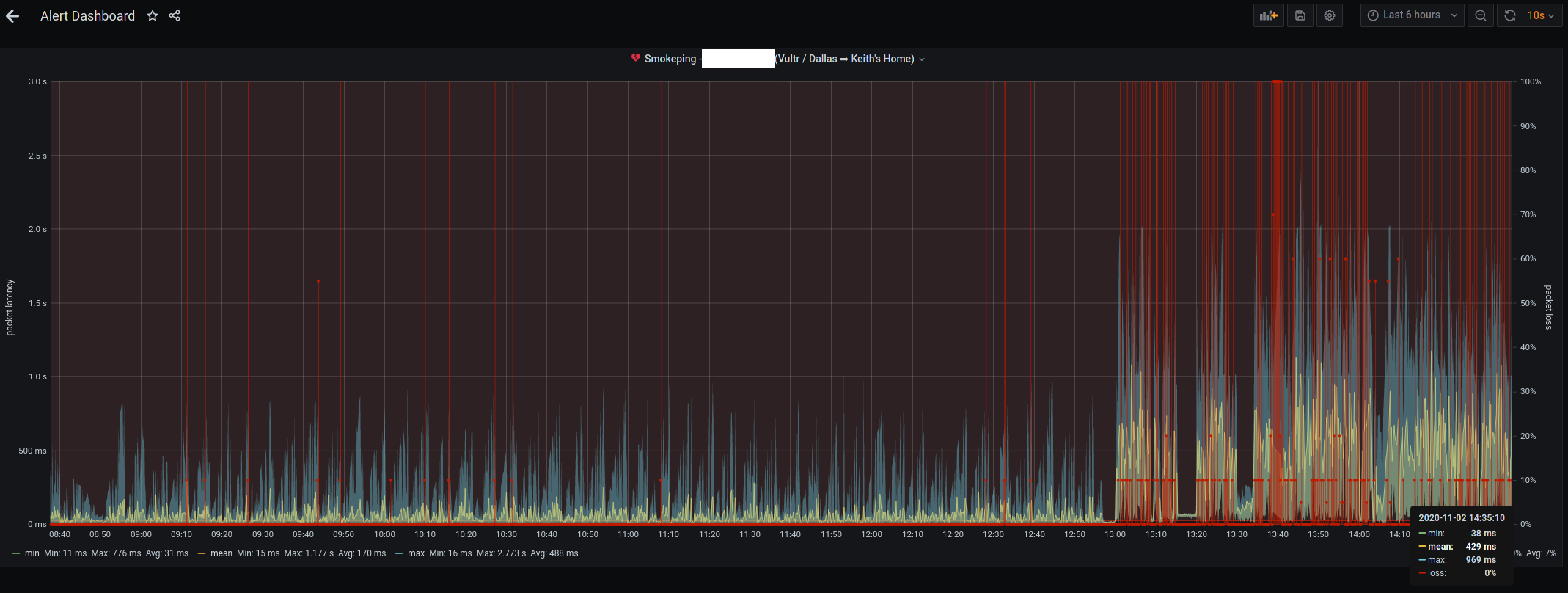
Chalk me up to that too. And my brother. Originally I'd used Ping Plotter. When I went 100% Linux I stopped using that. My brother ended up putting together a Grafana board tied to influxdb & infping and monitors several friend and family internet connections complete with alerts.
Here [0] is a screenshot of the Comcast cable connection from a year and a half ago. I have since switched to AT&T gigabit fiber. Here [1] is a screenshot from today.
I get more calls from users of my apps that have Comcast as the access provider than any other, and by far. The first thing I do when they have connection issues is check downdetector.com
I run a server that lets me receive calls wherever I am (SIP or forwarding, as required) and send messages. Like a self-hosted Google Voice but more flexible and with a greater choice of numbers + forwarding destinations.
All my server does is respond to HTTP requests from Twilio and send HTTP requests when I send a message.
Somewhere in the Twilio interface, you can define a SIP endpoint, but I forget where it is. That's enough for placing calls and does not require running a server.
Almost forgot to mention that I receive text notifications via pushover because I am not an Apple developer ... so no app for me.
It's cool that you do that, but "Doesn't everyone?" implies to me that you might be a bit out of touch. This is common among a certain type of person and unheard of for everybody else.
Yeah, that's the thing I think you imagine is true but actually isn't. I'd guess that the majority of HN readers don't do this, assuming they represent average technical employee across the industry. They probably _could_ if they needed to.. but I bet they don't. (Just based on my sample of: all the people I've worked with).
> I'd guess that the majority of HN readers don't do this, assuming they represent average technical employee across the industry.
That would be the disagreement then I think: you and him have different models of the majority HN reader. Based on my experience in the industry and on hn, I also don't think the typical hn commenter represents the average technical employee. Perhaps the typical hn reader does, but then I have a lot less information about that group.
I don't think it's right to say he's "out of touch" for an off the hand remark like that, even regardless of this discussion.
e: also, there is a poll option for hn posts, it might be interesting to find out more about who does/doesn't do this.
Yeah, I'm an engineer. I'd guess that neither I nor most of my coworkers do. It's much more common amongst lower-level engineers than, say, product engineers. Heck, I work full time in Python + Typescript and I don't even know Bash. I never even have things I want to script. Most of my time is spent making sense of code, not doing any sort of complicated repeatable task.
> A "sanity check" program for my internet connection to see if the problem is me, or Comcast
It's funny, I've never thought of doing this, but now realise it would be quite handy. Not just for connectivity but also some quick bandwidth/latency tests, and perhaps even a few basic internal network checks too.
The number of times I'm trying to troubleshoot Zoom calls these days... it would be handy to have a little bash script to run to rule out obvious issues.
For my specific use case, a big one would also be a quick automated check for whether my primary network connection is Wifi or Ethernet since I swap between the two and often forget which I'm currently using (which can impact connection quality if it's not the one I intended).
Looks pretty interesting! On my cursory glance it doesn't seem to by obvious what flavours of scripts it supports, other than the JS examples. Is it restricted to just Javascript?
I love pronounceable passwords, but there's research indicating that such generators typically produce lower than expected entropy. Do you mind sharing what algorithm you use?
The 84-bit number 10231239242746186561668573 can be represented as: ...
In 12-bit words of 5 letters or less: hits towel bloke gala blah jimmy barry
Diceware is good too.
A word of warning: be careful playing around with stochastic text generation if you're susceptible to delusions and hallucinations. You'd have to be pretty far gone to think "hits towel bloke gala blah jimmy barry" was a message from God, but of course we all know people who have fallen into that kind of belief, and the strain on credulity gets smaller as the text model gets more sophisticated.
Wouldn't a generator like this significantly increase risk of succumbing to dictionary attacks? I probably just don't understand part of what it's doing, but I'm curious.
It depends on what your baseline is. With knowledge of the generation algorithm, a dictionary attack on a password generated that way will definitely succeed, but on average it will take 2⁸³ tries (twice that at worst). At a billion tries per second this is 300 million years, almost long enough for the Sun to engulf the Earth if your attacker devotes only a single CPU to the task. There are commonly used password hashing algorithms that can only do a few hundred tries per second per CPU, which pushes the average success time to a quadrillion years, fifty thousand times the current age of the universe.
By contrast, trying every phrase of 20 words or less in every book that has ever been published would only take something like 129 million × 19 × 500,000 = 1.225 quadrillion tries. At a billion tries a second, that's only two weeks. (And if the password hash is inadequately salted, the attacker can use a rainbow table and put in that effort ahead of time and distribute it across all the victims.)
An attacker with more resources might devote a million CPUs to the problem, which would cut the time to success from 300 million years down to only 300 years (assuming a billion tries a second). In the next few decades it will become practical to devote much larger amounts of computation to problems like this, so such an attack might succeed, but currently it is beyond the capabilities of all but a few adversaries. And, as I understand it, Grover's algorithm will enable a large enough quantum computer to solve your password in only 2⁴² tries, which is only about four trillion tries, under an hour at the billion-tries-per-second speed I suggested above. I'm not sure, but I think it would need to prevent qubit decoherence for that period of time.
You can get equivalent security with a shorter password that looks like random gibberish, such as b7fc d750 9a52 ad6a e48c a, eedgckeimbjdefhcjclmghh, mgujdlrgdfmadtlidu, 1qvrx21zego0scvyi, 17uUPBKnfX7fSNY, >4h)&crV,+E{O, or 宜潨阰揫難侌, but those are a lot harder to memorize. They're shorter to type, though, and they're less vulnerable to side-channel attacks.
Looking random isn't good enough, though. They need to actually be random.
Please don't use $RANDOM or $((RANDOM)) or standard `shuf` for password generation. These RNGs are not cryptographically secure. Use input from /dev/urandom instead.
Modulo operations like these are another thing to avoid. To get equal chances for each word, the simplest thing to do is e.g.
    do
      wordlistlength = 10e3
      randomnumber = os.urandom(1) * 256 + os.urandom(1)
    while randomnumber > wordlistlength
    return wordlist[randomnumber]
(Adjust if your list length is greater than 255×256+256, of course.)
Further, I see that cracklib-small is 52k words. That's not good or bad, but it makes the default 4-word phrase 52e3⁴ ~ 63 bits of entropy, which isn't terrible but in my opinion on the short side as a default. It will be perfectly fine if you only ever want to defend against online attacks, but in some cases (think disk encryption or password manager) offline cracking should be kept in mind and for the rest you should usually use a password manager anyhow (so then memorability doesn't matter).
Or perhaps more succinctly: please don't roll your own crypto.
I understand that this is of course very unlikely to be abused if it's just for yourself and nobody knows of this weakness in your credentials (security through obscurity works... until it doesn't), but one day someone will use this as inspiration or it will spread somehow, say through an HN comment... just use good password generators or at least keep insecure ones secret.
Btw: many standard Debian(-based) installations have /usr/share/dict/words available so you don't need an extra install; I haven't seen cracklib used before but that might just be me.
LCGs are multiply followed by add followed by modulus, which is usually implied by a mask or a native word bit length rolling over. You should observe that multiplies have patterns in the lower digits which an add will only offset, and the modulus will only throw away high bits rather than mix them back in to the low bits. Consider the low digit in multiples of 7 (what you'd get picking a number between 0 and 9 inclusive via modulus):
The lowest digit has the sequence 7418529630 repeating, which isn't very random. Modulus preserves low order bits and throws away the magnitude of the number. The result is that if you want to get half-decent low-valued random numbers from an LCG, you should take x/range * limit rather than %. You can do this with integer arithmetic via multiply and shift if you have an integer twice the size of your LCG.
But again, don't use an LCG for generating your password.
[1] I looked at the source. Bash looks like it tries to use random(3) if it's available, otherwise it seems to use this, which doesn't have an add:
Sometimes I use passages from books. Easy to remember a >60 char password, can always check the book and it brings back to memory a book that I enjoyed each time I use it. For PINs I like to use a long sequence of digits of a physical/mathematical constant.
From books? Having anything that's natural language will kill your entropy, way way below correct horse battery staple. Moreso if it's indexed by Google Ngrams.
Yes. But it’s much more dramatic in the movie when the villain runs his finger along the spines of the books in your library idly but then his eyes narrow and he aggressively pulls a book off the shelf and flips it open to a well worn spot. Checkmate!
Just FYI, if there is an incentive to get your password, there are existing programs to match arbitrary length strings from books or any text source. One such program has been used to steal cryptocurrency from wallets that are generated from a passphrase like NXT.
Look at diceware.com for a good way to do that. You can calculate the entropy without "research". I use a simple python script for the purpose, filtering out the words < 7 chars long from /usr/share/dict/words instead of bothering with the official diceware list. Example output: "snored-Hoff-virtue-tab-eroded-Perl's" with estimated 87 bits of entropy. If you write the phrase on a piece of paper and refer to the paper when typing the phrase into a computer, then after a few uses you will remember the phrase without any special memorization effort. At that point you can shred or burn the paper, or possibly record it in an offline encrypted file requiring its own security efforts.
Also take a look at the EFF’s wordlists [1] as an alternative to the Diceware list. Quoting from their blog post, here are some issues with the Diceware list that they have resolved:
- It contains many rare words such as buret, novo, vacuo
- It contains unusual proper names such as della, ervin, eaton, moran
- It contains a few strange letter sequences such as aaaa, ll, nbis
- It contains some words with punctuation such as ain't, don't, he'll
- It contains individual letters and non-word bigrams like tl, wq, zf
- It contains numbers and variants such as 46, 99 and 99th
- It contains many vulgar words
- Diceware passwords need spaces to be correctly decoded, e.g. in and put are in the list as well as input
I haven't seen those in a while now. For random sites you should use a password manager anyway though, not try to remember a thousand passphrases. You're going to end up reusing passwords if you try to memorize them all, or else you'll have to write some down and then you are already using a password manager :). Or you use a system and then 1-2 cracked passwords/-phrases will likely break them all.
Note that this advice is for the average, common site. If you have special considerations for your bank, broker, or similarly high-value sites, different advice might apply of course (but this is not really the place for that and there are already enough recommendations online).
For ages I remembered this as 'battery-horse-staple-correct' but then I see loads of people saying 'correct-battery-horse-staple' so now I think I'm the one who is wrong.
I wonder which way round is actually the right way to say it?
ok typo on my part... anyhoo - does "correct" go at the front or back?! Because the way I read it, the speech bubble saying 'correct' is after the horse and the other two words.
I always find those annoying to copy (we use a lot of shared credentials, like when the customer gives us 3 accounts with different permission levels to pentest an application with) and it also simplifies the command to not have to specify all those symbols. You can also avoid the whole `fold` thing by just telling `head` to give you a certain number of -c instead of a certain number of -n.
</dev/urandom tr -dc a-zA-Z0-9 | head -c 16
(Then again, you were proposing an alias, so then command complexity/memorability doesn't really matter.)
Security level: log((26+26+10)¹⁶)/log(2) ~ 2⁹⁵ (95 bits of entropy), comparable with adding those 12 extra symbols: log((26+26+10+12)¹⁶)/log(2) ~ 2⁹⁹. (Adding a character makes more sense than adding a symbol if you want more security, all else being equal of course.) If a stupid application still has outdated password requirements (thankfully this is rare among the applications I use) then one can of course add the classic ! at the end.
Right, I forget that it's not the default to print a \n as the first character of your PS1. Doesn't make sense to me that this isn't the default, as there are quite a few commands that might not end with a newline and then it messes up the prompt position, and it doesn't impact backwards compatibility to add it now.
Arch Linux. When using Zsh the last char is always a '%'. When using Bash it does no show a '%' but there's no line break. Possibly an weird interaction with my $PS1.
You can replace "cat /usr/share/dict |" in that invokation with "</usr/share/dict" and it will be equally easy to switch between tr and sed. Yes, you can put that redirection at the start, not just at the end of a command line. Although I admit I still haven't got used to doing it.
> Please don't use $RANDOM or $((RANDOM)) or standard `shuf` for password generation. These RNGs are not cryptographically secure. Use input from /dev/urandom instead.
When using shuf for cryptographic purposes, I'd first check if it advertises as being able to be a secure cryptographic token generator when provided with a secure random source. It might very well use modulo operations, for example.
Yeah, I think OP might be more interested in "what is the most elaborate program you wrote only for your personal use?" Most of my personal programs have been command-line script. I have written a couple of single-page web apps and a Mac app once. These were more learning projects than programs I used long term.
* A replacement front-end for "tar" and various compressors
Could you elaborate on this? I feel like this is something that could save people hours of time. I'm so incredibly sick of the various decompression flags and tools, (de)compressing something on the commandline should be as easy as it is with a GUI.
I've memorized a total of two commands from decompressing things (`tar xfv $file` and `unzip $file`) and one for compressing (`tar cf $archive.tar $file1 $file2 $directory`) which seems to have done everything I've wanted for more than 20 years of unix usage. Is there something I'm missing out on? Sometimes, a `gunzip` or `7z` has been needed, but they are far apart that I can look it up each time. I'm not sure how I can save hours of time as non-tar or non-zip files is not something I often come across.
I just use dtrx: https://github.com/moonpyk/dtrx. That only does decompression, but that's generally good enough for me and supports basically everything (even more exotic stuff like Java JARs and DOCX, which are both ZIP archives under the hood).
If you're using GNU tar, there are four short options to specify compression/decompression: -Z for compress, -z for gzip, -j for bzip2 and -J for xz.
Using long options, you can specify --compress, --gzip, --bzip2, --xz for the same, or even --lzip, --lzma, --lzop or --zstd for others.
That's exactly why people hate tar/UNIX generally. Tons of parameters that don't EVEN CLOSELY represent their purpose. For example: -j -J if noone told me, I'd assume they were "join" or "jump", or something.
PS: zcvf zxfv, and, - surprise, surprise! - by default tar deletes source archive!



Off the top of my head, the most used ones are:
* A replacement front-end for "tar" and various compressors
* A script to synchronize my music library to a compressed version for playing in my car
* A secure-but-readable password generator
* A system to batch compress folders full of video files. (For ripped blu-ray discs, mostly.)
* A replacement front-end for "ffmpeg", see above
* A "sanity check" program for my internet connection to see if the problem is me, or Comcast
* A front-end for "rm" that shows a progress bar when deleting thousands of files. (Deletes on ZFS are unusually slow.)
And lots more tiny things.