MacWrite was a WYSIWYG word processor. You could change the fonts or other formatting and see the results updated on the screen.
WordStar and WordPerfect were for DOS. They were not WYSIWYG. Sure they were powerful word processors for professionals, but they were not “like” MacWrite. MacWrite was a tool for regular people.
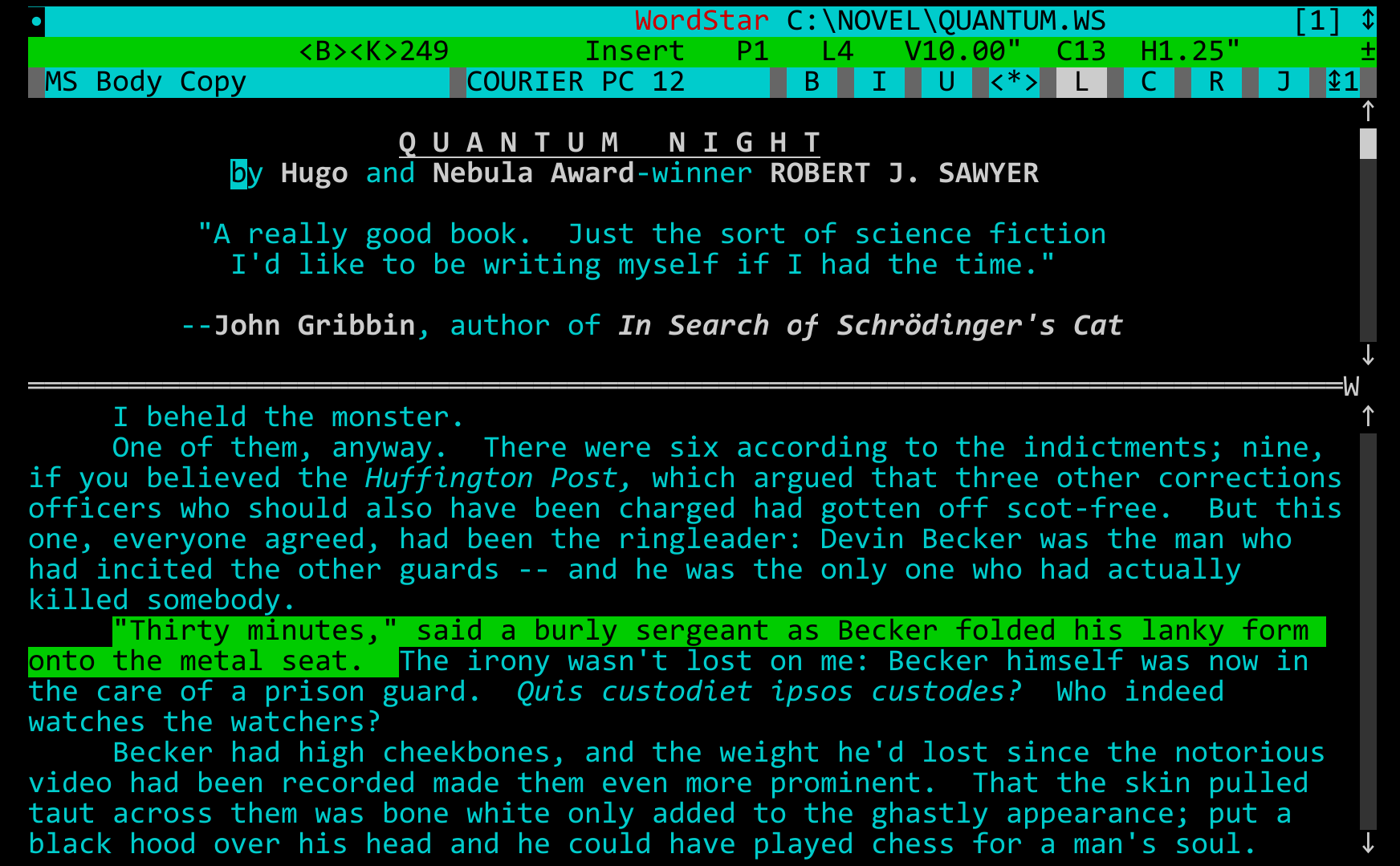
I absolutely would have described WordStar as a WYSIWYG editor. [0] You have no content markings, you do have pages in sight, and flowing text. You set the text to bold, and the font displayed is bold, etc.
I don't think I'm alone in that judgement, as Wiki says:
"WordStar was the first microcomputer word processor to offer mail merge and textual WYSIWYG." [1]
So... You might need to expand why you think that this is not true.
Textual means that it ran in text mode. That doesn't mean that it did not have fonts. It... Did. There's two fonts in the screenshot I linked beforehand.
The main body text is Courier, and the titlebar text is generally called "CCSID 437" or the OEM font. Both standard IBM fonts from the era. They're not the same fontface.
WordStar had full support for the PC-8 Graphic set. It is pre-TrueType Fonts, but so was the software. By the time WordStar landed on Windows, it had support for everything you'd expect from anyone else.
Honestly, I do not see the different fonts in the image. I see the status line showing the Courier font name. If it is different from the body text, I cannot distinguish it.
Obviously WordStar was limited by what DOS could render, so the variety of fonts available had to work in a drastically constrained bitmap. I could also not find samples of the PC-8 graphic set.
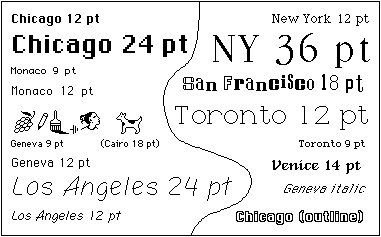
But for comparison, here are the original 1984 Macintosh system fonts:
Okay... Let's try a different approach here. "DISPFONT.EXE" and "DISPFONT.OVR" are key files you'll find in WordStar's archive [0].
I don't have a CP/M emulator on hand to fire up the original to show you an example, as WordStar pre-existed DOS.
But this is a quote from v3, the first DOS version, from the manual:
---
Screen Fonts for Preview
At the Add or Remove a Feature screen, you can install three
different types of screen fonts for Preview. The screen font
options are Code page 437, Code page 850, and PostScript fonts.
If you want to install PostScript fonts, install both PostScript
and code page 850 fonts. (Be sure to set the code page to 850 in
DOS. See your DOS manual for instructions.)
Hi, actual WordStar-in-practice, wrote several hundred thousand words on it in both CP/M and DOS, user here (related: I am old). I think you're confusing WordStar's preview display with its editing display here. Later versions of WordStar for DOS (I think it started with version 5.0, but I wouldn't swear to it) could generate a surprisingly good for the day print preview using PostScript fonts, as described above in the text you're quoting. But that was a specific read-only mode. When editing, WordStar ran in DOS text modes and was limited to what DOS text modes were able to display: monospaced fonts, usually with the ability to display boldface text with "bright" text and sometimes -- not always -- with the ability to display underlined text with actual underlines. (This depended on your video hardware; IIRC, XyWrite seemed to be able to do that pretty reliably in DOS, but WordStar didn't). But you couldn't display proportional type in editing, or italics, or different typefaces.
Now, you could argue that WordStar anticipated WYSIWYG editors, because it did its best to faithfully reproduce margins, indents, line spacing, justification, etc. in its text editing mode -- but that attempt came from the era when printers could only output monospaced type, usually just one typeface, no italics, etc. Once printers got better, WordStar really wasn't WYSIWYG anymore, just "best effort within limitations". IIRC, the only major DOS-based word processor to actually attempt a WYSIWYG editing display was WordPerfect 6.2 in the late 1990s.
Thanks for this. I've never used WordStar, and my knowledge of early word processing software is certainly incomplete, but this is the first time I've seen such a screenshot that predates 1984.
This is why the Apple LaserWriter was such a big deal. It came out 1 year after the Macintosh, merging Canon’s laser printer engine, Adobe’s PostScript, and the Mac’s bitmapped display with proportional fonts.
WYSIWYG means "What You See Is What You Get." If you want the title to be Courier 24 point Bold then that's what you see on the screen. If you are writing in a proportional font with proper kerning then that's what you see on the screen. You don't see a fixed width substitute.
This is what enables you to do proper typesetting and page layout for a document, and using a PostScript printer such as the Apple LaserWriter you could do desktop publishing [1]. Desktop publishing was invented by Xerox PARC but the revolution began when Apple made it available to the masses with the Macintosh and LaserWriter.
Apple didn't invent any of these technologies but they were the first to put them all together into a package for the mass market and made them incredibly easy to use. Suddenly, grandma had a tool she could use to write and typeset the weekly church newsletter from home, and even print it on her LaserWriter at home. If she wanted to do a newsletter like that just two years prior she would have had to hire the services of a print shop to do both typesetting and layout as well as printing.
She could still have used WordStar or WordPerfect and printed with a dot matrix printer, but that doesn't get you large, proportional fonts or layout.



WordStar and WordPerfect were for DOS. They were not WYSIWYG. Sure they were powerful word processors for professionals, but they were not “like” MacWrite. MacWrite was a tool for regular people.