Just like with web browsers, I use multiple editors all day long on OS X. Currently open, I have: Sublime 3, Textmate 2, BBEdit 11, Xcode 6, Rubymine 6, and (only because I visited this post and just downloaded it) CotEditor 2.
There is certainly a tradeoff in the sense that I don't tend to memorize all the features of every editor, so I may not be as effective in any of them as a power user who sticks to one of them. OTOH, the Mac has excellent basic text conventions for word/line/paragraph selection, indent/dedent, etc.
Also, I tend to use the different editors for different purposes. Batch find/replace? BBEdit. Objective-C? Definitely Xcode, it't the only native editor with even semi-reasonable autocomplete. Scripts and single-file text documents? These days Textmate 2 (used to be Sublime).
So you still end up knowing the shortcuts and advanced features that apply to your editing scenario, even though they may not be in the same editor. But you don't get the raw, low-level text editing power that comes with mastering something like vim (which I do use a lot, too, but with such polygamous editing habits, am unlikely to master).
The upside of using multiple editors is that you can pick the one that suits you best for the job at hand; another fringe benefit is that you also get to enjoy countless hours trying out every single new editor that comes out. ;-)
BBEdit's multi-file search and replace (and it's compare) alone are worth it. I keep coming back to BBEdit for search and replace, even if I prefer other editors for other things.
I use a lot of different editors too, rotating among favorites. The one thing I do not consistently use are modal keyboard-centric editors like vim and emacs. I get that some people like them, but they've never done much for me. (And yes, I do know how to use them. I'm old enough that I upgraded to vim early on.)
> The one thing I do not consistently use are modal keyboard-centric editors like vim and emacs.
As a vim-er and not an Emacs-er, asking genuinely and not out of snark, surely Emacs is eminently non-modal (at least, not modal in the same way that vim is)?
emacs has plenty of modes, although actually that's not really my big problem with emacs (or vim) when I think more about it. It's needing to remember stuff rather than recognize and select (which is the fundamental advantage of GUI, if you don't like remembering things).
Most of the stuff I see vim/emacs-ers boast about are easily achievable by me with a mouse or so obscure that I'd never remember them when I needed them. But that's me. Some people are good at and/or like remembering shortcuts.
This is not the sense in which vim is called a modal editor—at least, I think of it as meaningfully different. In different Emacs major modes, for example, the tab key might create different indentations; but, in different vim modes, the 'x' key might remove a character (in normal mode) or insert an 'x' character (in insert mode).
I think of the statement "vim is a modal editor" as "vim replaced key chords with mode toggles"—a different editor would replace "press 'x' in normal mode" by something like "press 'M-x'."
Again, I am certainly aware that Emacs modes can do much more than just offer context-sensitive indentation, but my impression (as a non-Emacs-er) is that they are usually meant to offer subtle customisation rather than full-scale re-engineering of the editor.
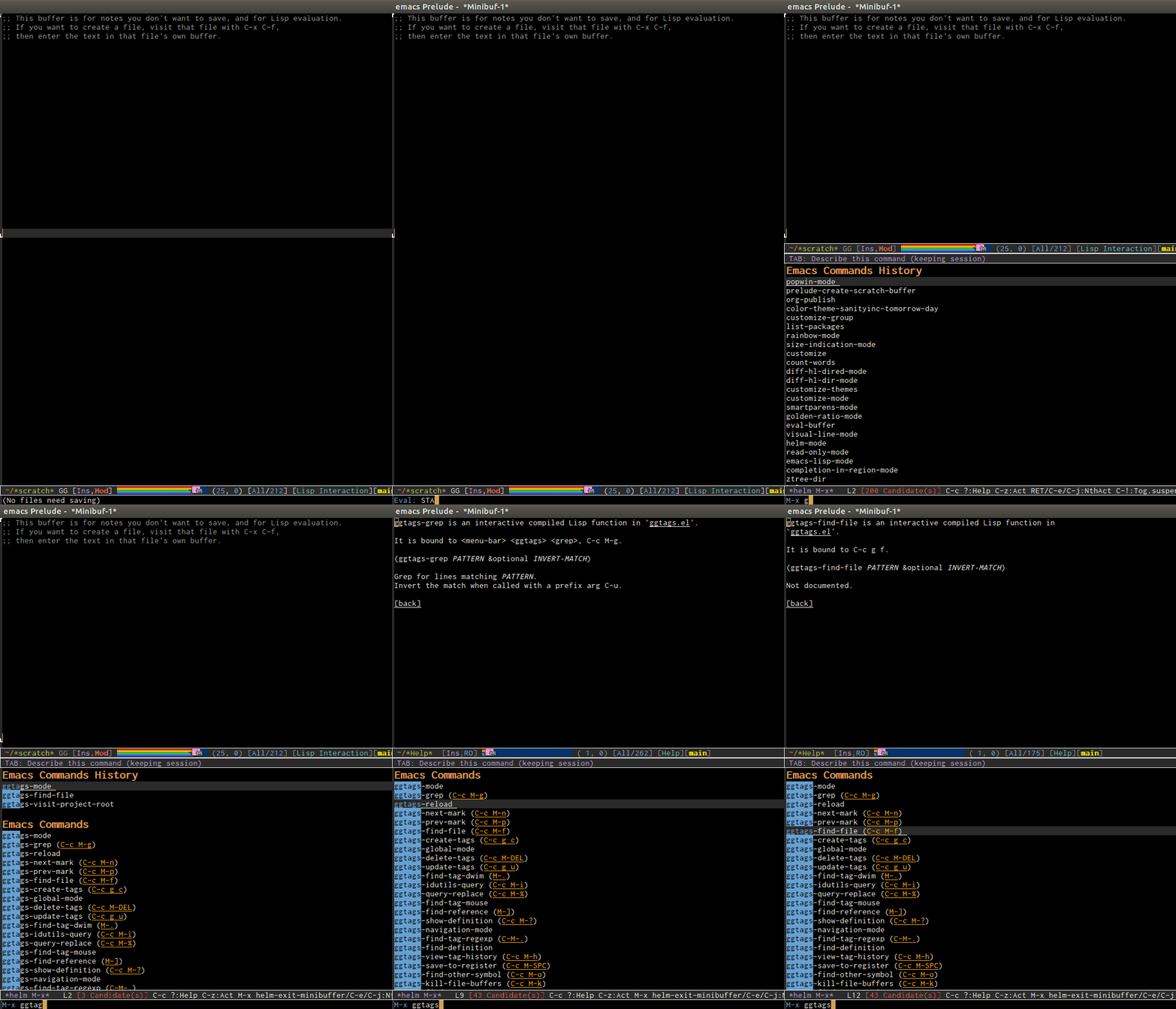
You never need to remember keyboard shortcuts for major modes. When you forget, you can always bring a "cheatsheet" using "C-h m" which lists all key bindings of current major modes and minor modes. Every time I'm new to a major mode, I always use this table. If you forget any key binding but remember prefix key, I press <prefix key> + C-h to bring all the key bindings that start with that <prefix key>. If you ever forget key binding but remember the command, use helm-M-x that list key bindings along side with the commands. DEMO: http://tuhdo.github.io/static/part3/helm-m-x.gif . In Emacs, I NEVER remember things consciously; I keep using something until it is recalled effortlessly. On the other hand, it's not like you don't have to remember things with those fancy GUIs. Take Eclipse as an example. You would have to steps through meaningless GUIs to configure something to work, and you have to remember those steps mechanically the next time you setup something. I would rather learn a consistent programming language with actual easy to remember rules to first configure simple things, and later extend my editor, rather than stepping through those meaningless GUIs.
And what you said that most of the stuff that are easily achievable with a mouse, try to do equivalent things like this in SECONDS: http://emacsrocks.com/. Well, that's why my co-workers work so hard why I have time to enjoy other things during my daily work.
What you said, like many other people who didn't learn Emacs properly or left it for so long that don't know what Emacs is currently capable of, is seriously outdated.
You should have a look at my post in this thread: https://news.ycombinator.com/item?id=8639804 to see what Emacs is capable of that I could never find in any other editors, and even IDEs.
> Well technically Emacs is just a Lisp interpreter with some text editing facilities by default. With evil-mode it is just as modal as vim throughout.
I don't mean to suggest that Emacs can't be made into a modal editor—saying "Emacs can't do that" is good only as a reverse-psychology tactic to convince someone to make Emacs do that—but rather that it is not "by its nature" such; that is, that someone is unlikely to choose Emacs, over vim say, because it can be made modal.
Emacs can make Vim a subset of it. You should check spacemacs: https://github.com/syl20bnr/spacemacs. It was made by Vimmers and is ambitious: it wants to replace not only the "editor" inside Emacs, but also rebind everything else to Vim's convention. Evil-mode can do everything in Practical Vim, I was told by a Vim user switched to Emacs.
Well, the EVIL-mode is used by a lot of people who want the features of GNU Emacs and a modal interface. If you search around there are several people with detailed reports why and how they switched to a modal GNU Emacs.
Yeah, that surprised a lot of my friends, too (especially considering my 2010 blog post[1] entitled "Mother fuck TextMate to hell").
But it won me over in a few of ways:
1) It's a native Mac app. An honest to goodness, OS X app with native widgets, text Services in the contextual menu, and an all-around attractive UI that works well with just about every OS feature.
2) It's open source now. Even though I haven't yet fixed any of my issues with it... I could.


There is certainly a tradeoff in the sense that I don't tend to memorize all the features of every editor, so I may not be as effective in any of them as a power user who sticks to one of them. OTOH, the Mac has excellent basic text conventions for word/line/paragraph selection, indent/dedent, etc.
Also, I tend to use the different editors for different purposes. Batch find/replace? BBEdit. Objective-C? Definitely Xcode, it't the only native editor with even semi-reasonable autocomplete. Scripts and single-file text documents? These days Textmate 2 (used to be Sublime).
So you still end up knowing the shortcuts and advanced features that apply to your editing scenario, even though they may not be in the same editor. But you don't get the raw, low-level text editing power that comes with mastering something like vim (which I do use a lot, too, but with such polygamous editing habits, am unlikely to master).
The upside of using multiple editors is that you can pick the one that suits you best for the job at hand; another fringe benefit is that you also get to enjoy countless hours trying out every single new editor that comes out. ;-)